» Image to Model: one picture in, a 3D asset out, generated on your own GPU «
Contents
- Image to Model in the Asset Handler
- The test
- Time and VRAM
- Quality against time
- Colour shifts in the textures
- The results, image by image
- Model by model
- And the cloud?
- Conclusion
Licences: this is research only. I ran these models to see what is possible locally, not to say that you may use them. Several models are non-commercial, gated or not licensed in the EU, and licences change. Before you use a result in a project, read the full licence of the model and of every part it uses, the ASSH shows them before every download. The licence notes in this post are what the ASSH model list showed at the time of the test. They are no legal advice.
For version 1.30.0 of the Asset Handler I built “Image to Model”: you give it a picture and it makes a 3D model out of it, right inside Houdini. Before it goes out, I wanted to know which of the many open models are really usable, so I ran all of them through the same test.
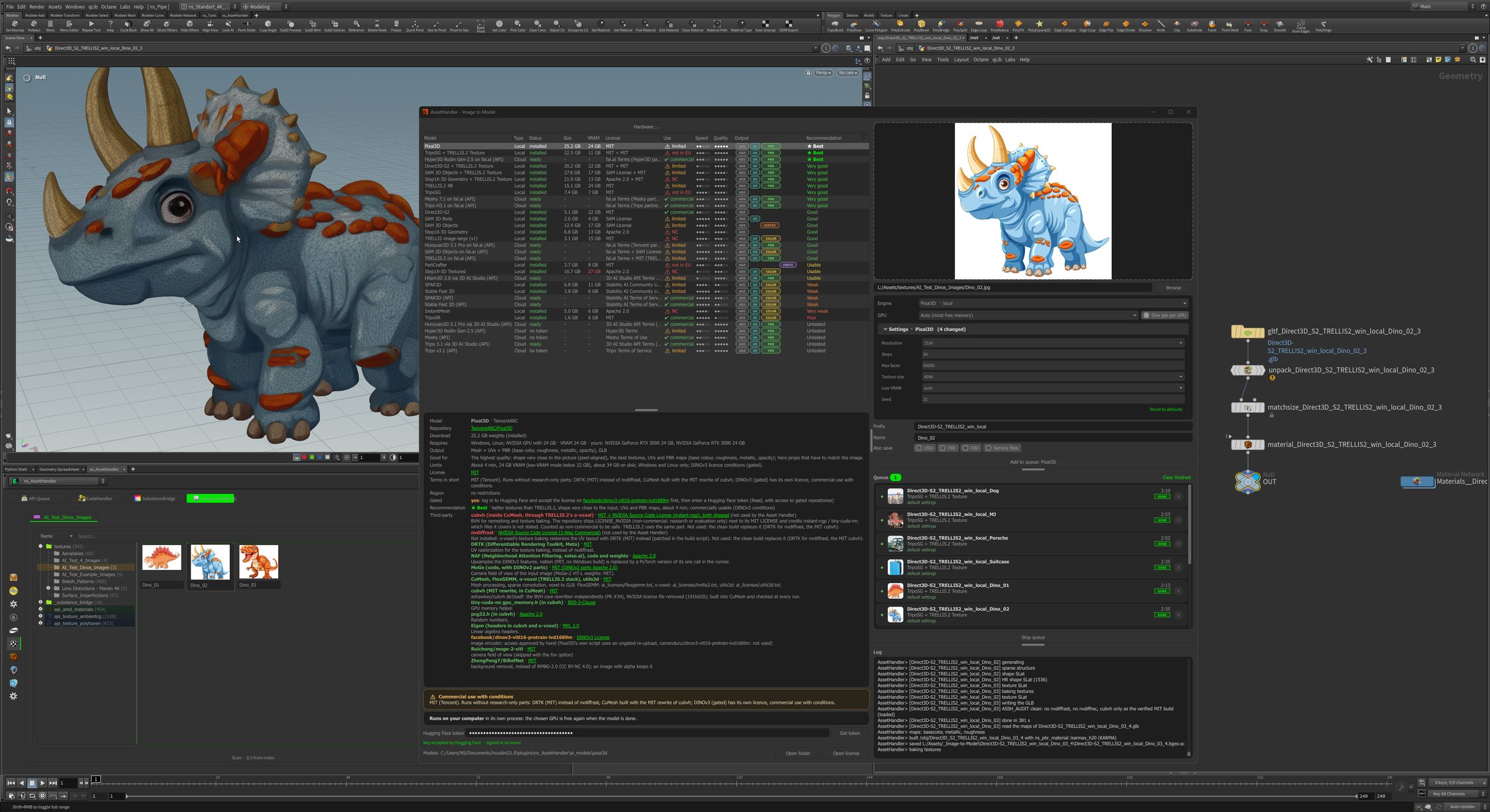
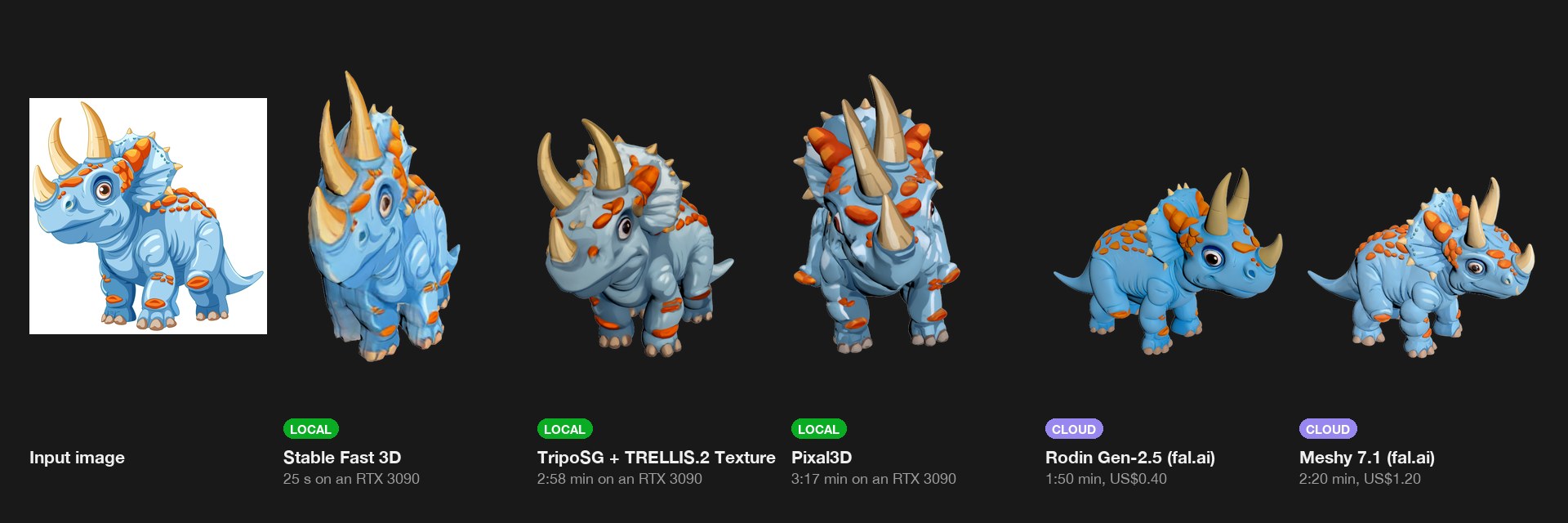
The main question was: how far do you get locally, on your own machine, without uploading anything and without paying per model? So this post is mostly about the local models. I tested the cloud services too, at the end there is a comparison.
All numbers are measured on one machine, a Windows 11 workstation with two RTX 3090 (24 GB each). On other cards the times will be different, but the relations should be similar.
Image to Model in the Asset Handler
Image to Model comes with Asset Handler 1.30.0. In short:
- One window, many models. The model list shows the licence, the download size, the VRAM need and a speed and quality rating for every model. A model is installed with a right click. Before the download you see the full licence texts and links (gated models show where to request access).
- Runs locally, in its own process. Every model has its own Python runtime, the generation runs outside of Houdini. Houdini stays responsive and you can stop a job any time. You pick the GPU per job.
- A queue, one job per GPU. Queue several images; with two GPUs two jobs run at the same time.
- Straight into the library and the scene. Every result lands in your asset library under
_Image-to-Model/<name>/(GLB,.bgeo.sc, the source image, the texture maps and a JSON with the settings and the time) and is built in/objwith the right size and a material for your active renderer. - Combinations. A geometry model (TripoSG, Direct3D-S2, Step1X-3D, SAM 3D Objects) can be combined with the texture stage of TRELLIS.2: the shape of the one gets UVs and PBR maps (base colour, roughness, metallic) from the other.
- Settings per model (steps, resolution, face count, texture size, seed, remesh …) with defaults that work.
- “Also save” writes every result as USD (with a UsdPreviewSurface material), FBX and OBJ too.
- SAM 3D Body results come rigged as a KineFX character (127 joints, skin weights, Rig Pose to change the pose).
- Cloud services work too, with your own API key. The key is checked when you enter it and the balance is shown.
The test
| What | Details |
|---|---|
| Machine | Windows 11, 2 x NVIDIA RTX 3090 (24 GB each), GPU 0 also drives the display |
| Houdini | 21.0.792 FX |
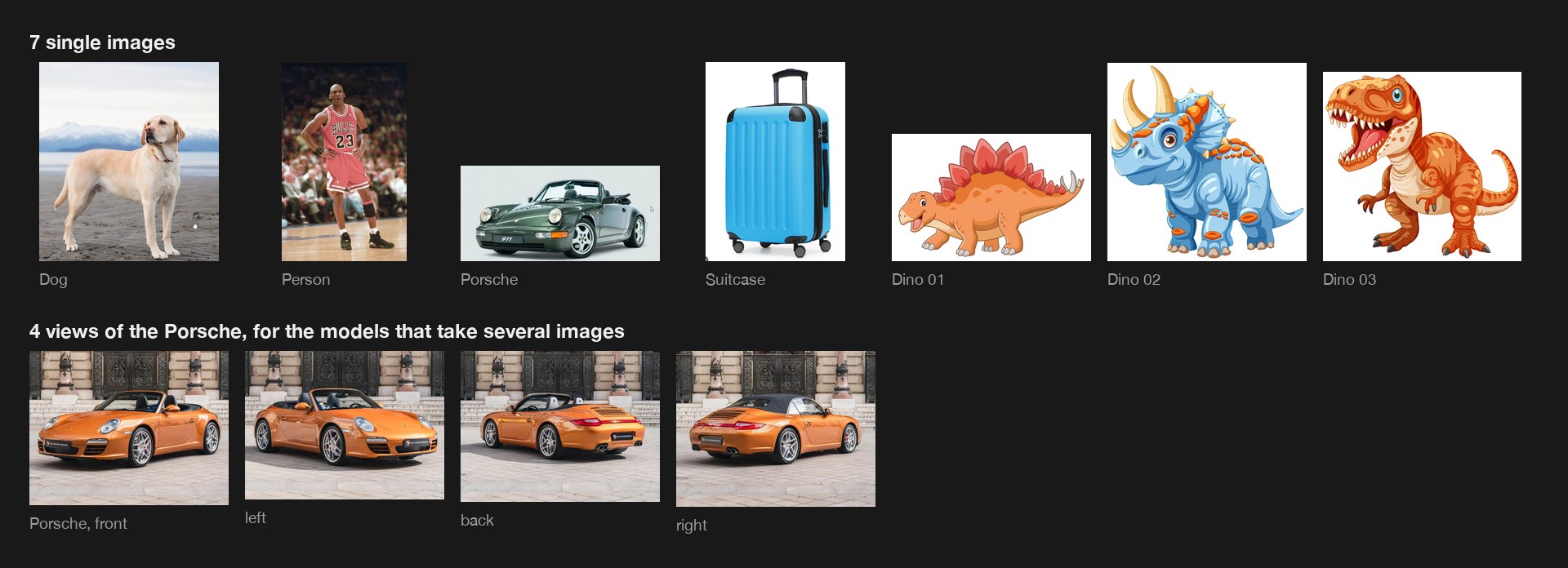
| Images | 7 single images: a dog, a person, a Porsche, a suitcase and three dinosaur illustrations; plus 4 views of the Porsche for the models that take several images |
| Settings | A = the defaults of the model. B = “more quality”: more steps or a higher resolution, 50k faces, 4K textures where possible |
| Runs | Local: 214 runs of 16 models and combinations, 172 of them by a benchmark script (7 images x A/B) through the same code as the window, two jobs in parallel, one per GPU, plus 42 runs I made before by hand from the window. Cloud: 49 runs of 9 cloud models with the default settings of each service (Stable Fast 3D, SPAR3D and Hitem3D only once each) |
| Measured | time with model loading (the build in Houdini not counted), VRAM peak of the whole card every 2 seconds |
Time and VRAM
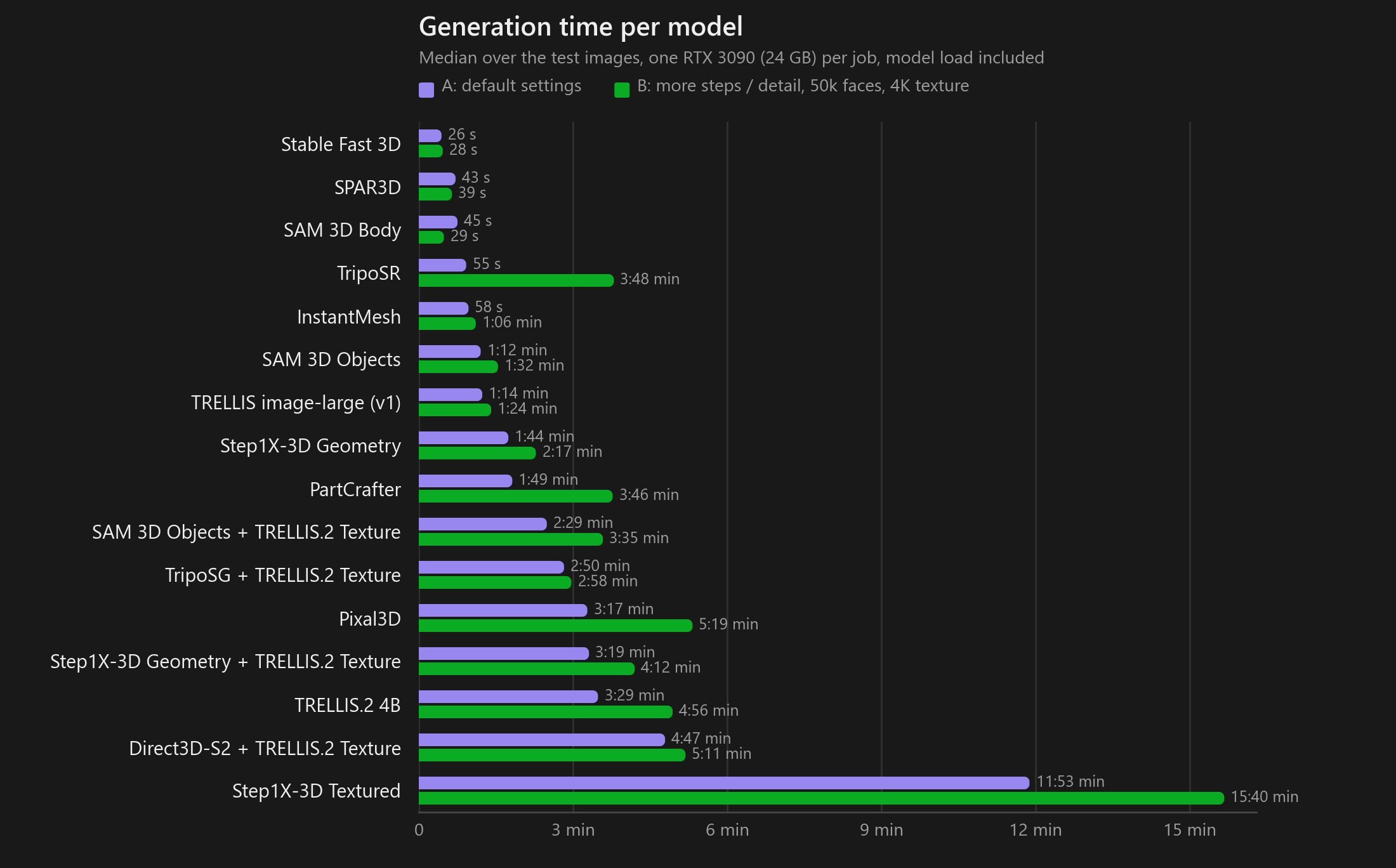
On a 24 GB card the models fall into four groups:
- Under a minute: Stable Fast 3D, SPAR3D, SAM 3D Body, TripoSR, InstantMesh. Good for previews and blockouts.
- 1 to 2 minutes: SAM 3D Objects, TRELLIS v1, Step1X-3D Geometry, PartCrafter.
- 2.5 to 5 minutes: the complete assets with UVs and PBR maps: TRELLIS.2, Pixal3D and the “+ TRELLIS.2 Texture” combinations.
- Over 10 minutes: Step1X-3D Textured, which also fills the whole card. The combination Step1X-3D + TRELLIS.2 Texture gives the same shape with more maps in about a third of the time.
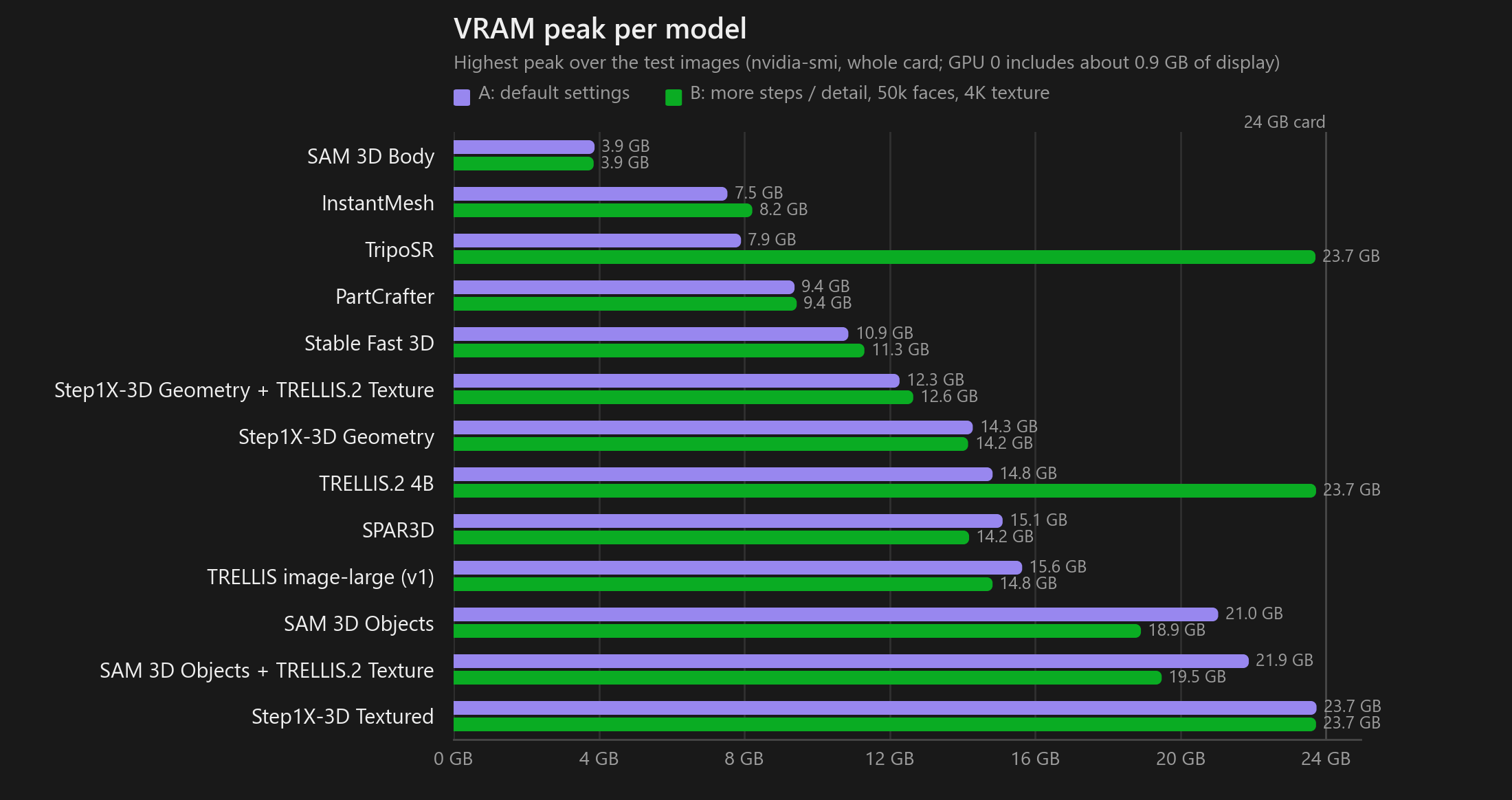
The 24 GB wall does not crash, it gets slow. When a job needs more than the card has, the NVIDIA driver on Windows moves memory into the system RAM instead of failing. The job finishes, but slowly:
- TRELLIS.2 at the 1536 cascade: most images 4 to 5.5 min, but two images hit the limit and took 10 min and 57 min.
- TripoSR at resolution 512: four times slower than at 256, always at 24 GB, and 150k to 340k triangles without a visible gain.
- Step1X-3D Textured runs at the limit all the time (12 to 16 min, one run 25 min on the GPU that also drives the display).
- Pixal3D at 1536 needs its low-VRAM mode below 32 GB. The ASSH switches it on by itself.
So on 24 GB: keep TRELLIS.2 and TripoSR at their defaults. If a job takes much longer than usual, the card is full. Close other GPU programs or use the second GPU.
Little VRAM? SAM 3D Body (4 GB), InstantMesh and TripoSR at defaults (6 to 8 GB) and PartCrafter (8 to 9 GB) also run on much smaller cards. The quality is lower, PartCrafter aside, which has another job: parts.
Quality against time
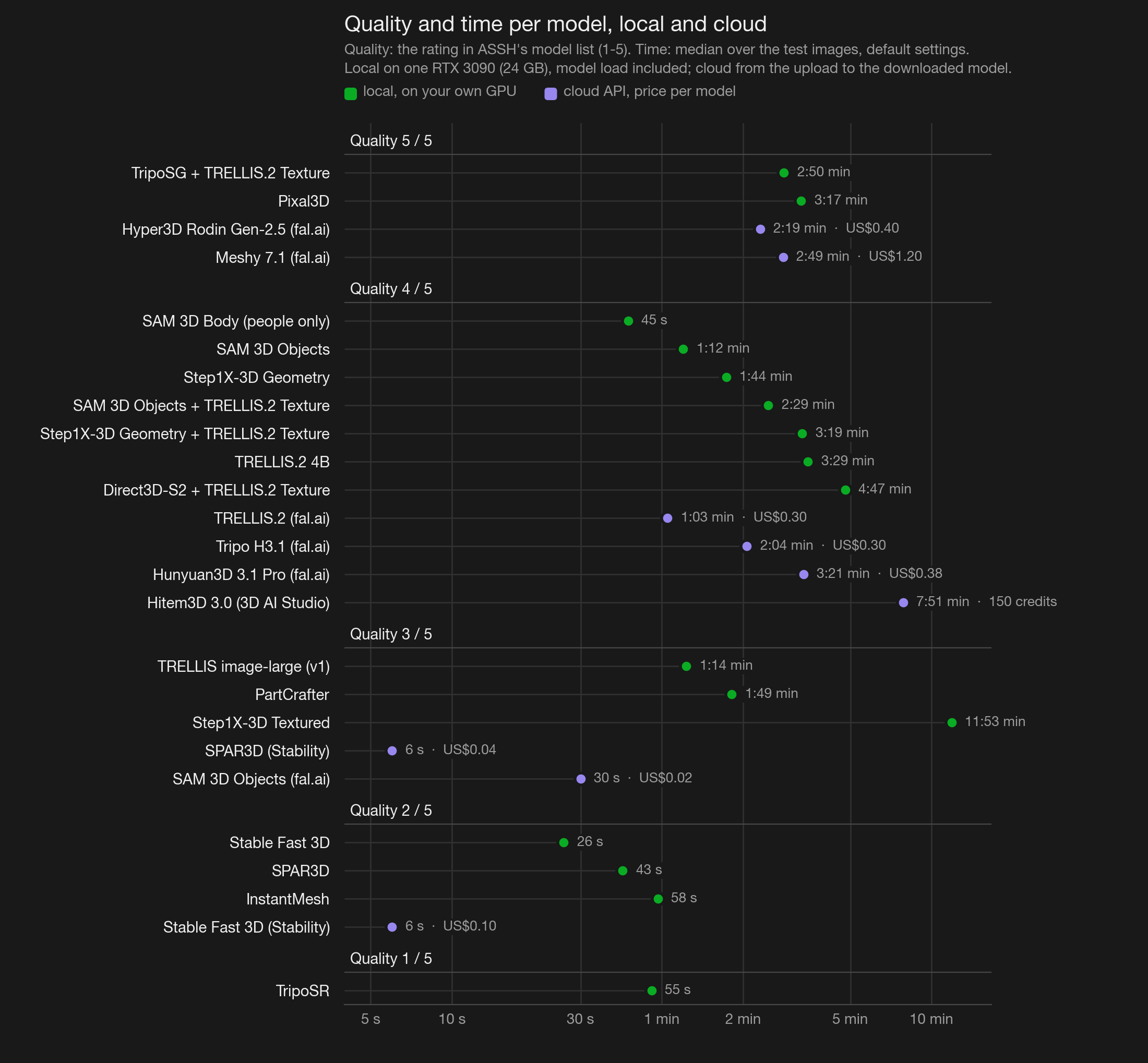
The quality rating is the one the ASSH shows in its model list, from 1 to 5, from my own tests on this machine. There is no single best model. The top group locally is TripoSG + TRELLIS.2 Texture and Pixal3D, both under 3.5 minutes. Below that it depends on what you need the model for.
“More quality” costs less than I thought, with three exceptions. More steps added 10 to 40 % for most models. Expensive were PartCrafter with 8 instead of 4 parts (2x, every part is decoded on its own), TripoSR at 512 (4x) and Pixal3D at 1536 (+60 %).
The combinations pay off. The TRELLIS.2 texture stage adds about 1.5 to 2 minutes to a geometry model and turns a bare mesh (Step1X-3D, TripoSG, Direct3D-S2) or a vertex-coloured one (SAM 3D Objects) into an asset with UVs and PBR maps. Step1X-3D goes from 1:44 to 3:19 min, SAM 3D Objects from 1:12 to 2:29 min. Only one model is in VRAM at a time, so the peak stays at the bigger of the two.
Colour shifts in the textures
The shapes are mostly fine, the colours are often not. Some shifts are dramatic. All captures use the same viewport lights, so the differences come from the textures, not from the light.
Keep in mind: all pictures in this post are OpenGL viewport captures from Houdini, not renders. The viewport shows the maps only roughly, roughness and metallic for example. In a render, with Karma for example, the same asset can look quite different, better or worse. So take the pictures as a comparison between the models, not as the final look.
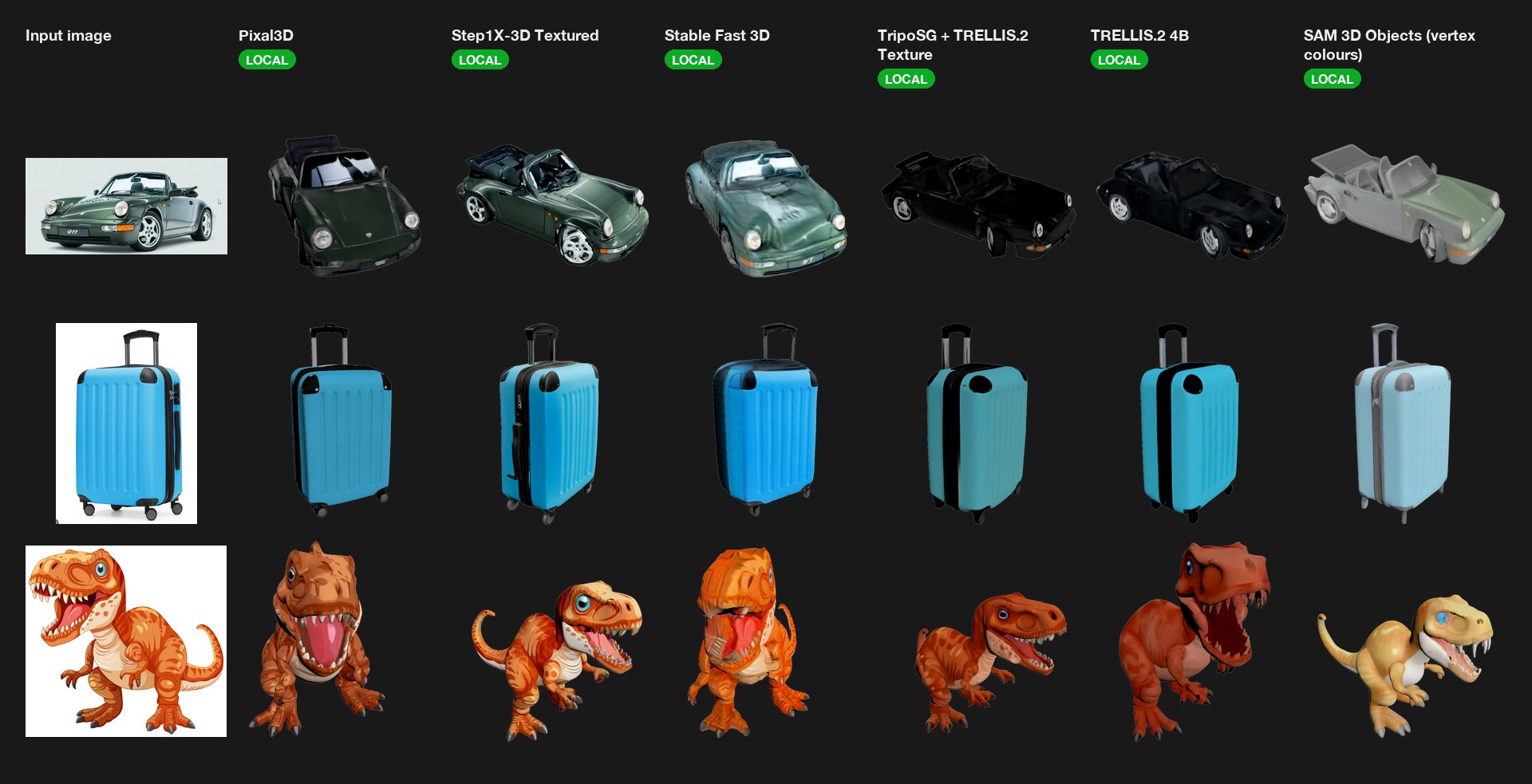
- Models that project the photo keep the colours closest, at least from the front: Pixal3D, Stable Fast 3D and Step1X-3D Textured. Step1X-3D Textured matches best, but takes 12 to 16 minutes and is non-commercial.
- The TRELLIS.2 texture stage (TRELLIS.2 and all “+ TRELLIS.2 Texture” combinations) makes its own PBR maps and guesses the material. The green glossy Porsche becomes almost black metal (base colour near black, metallic about 0.9), in a render with reflections it is dark chrome, not green paint. The sky blue suitcase turns into a duller turquoise, the orange T-Rex into a darker red-brown; with setting B it gets even darker. On the dog and the person the colours were fine.
- SAM 3D Objects on its own only has vertex colours, and they are washed out and off in hue: the car grey-green, the suitcase almost white, the T-Rex yellow. With the TRELLIS.2 texture stage on top you get UVs and PBR maps, but then with the shifts above.
- The fast models keep the hue, but TripoSR is dark and smeared, SPAR3D blotchy.
So if the colour has to match, Pixal3D and Step1X-3D Textured came closest in this test, otherwise plan a correction. The texture maps are saved as files in the asset folder, a hue and saturation fix on the base colour (and a look at the metallic map) is quick.
The results, image by image
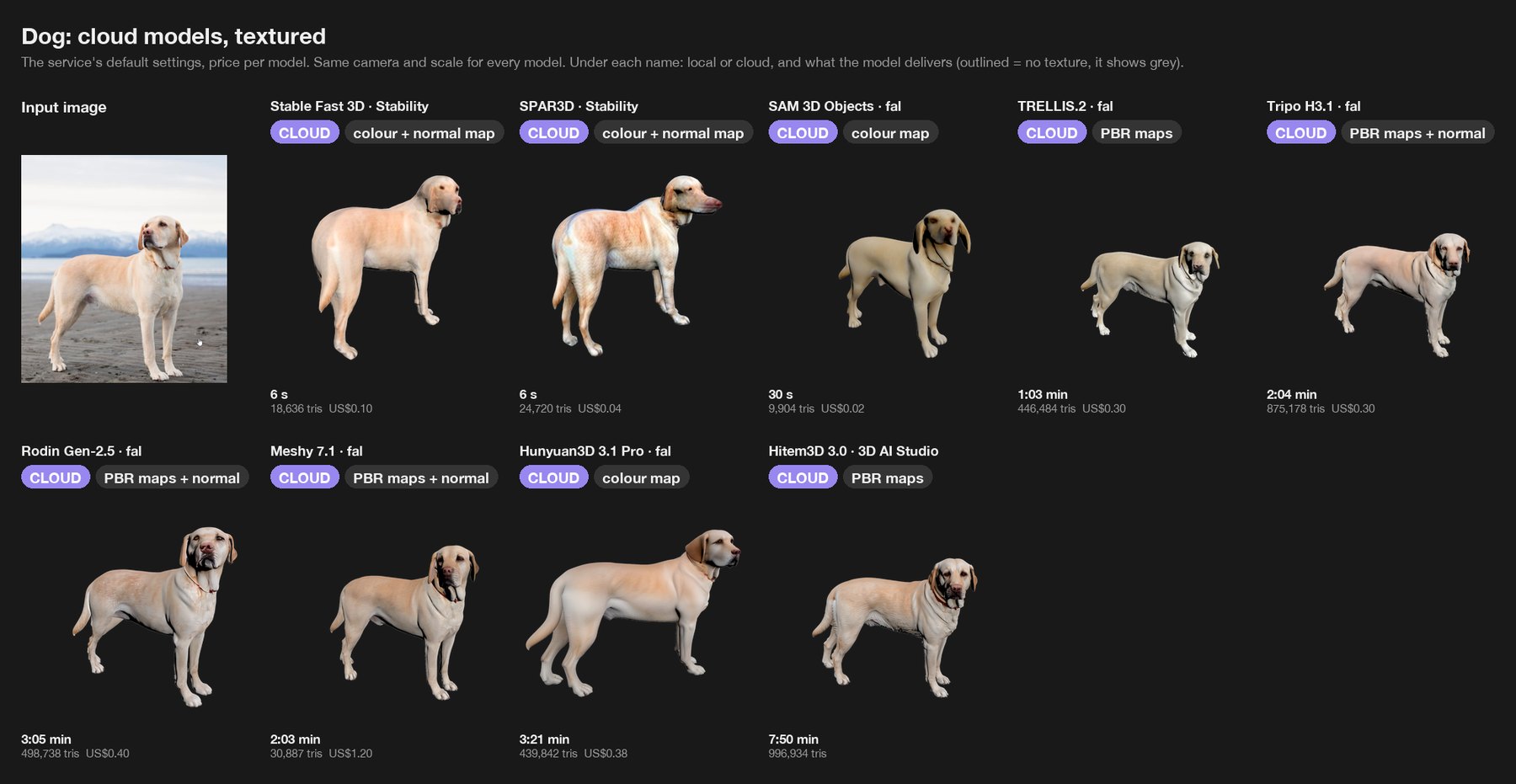
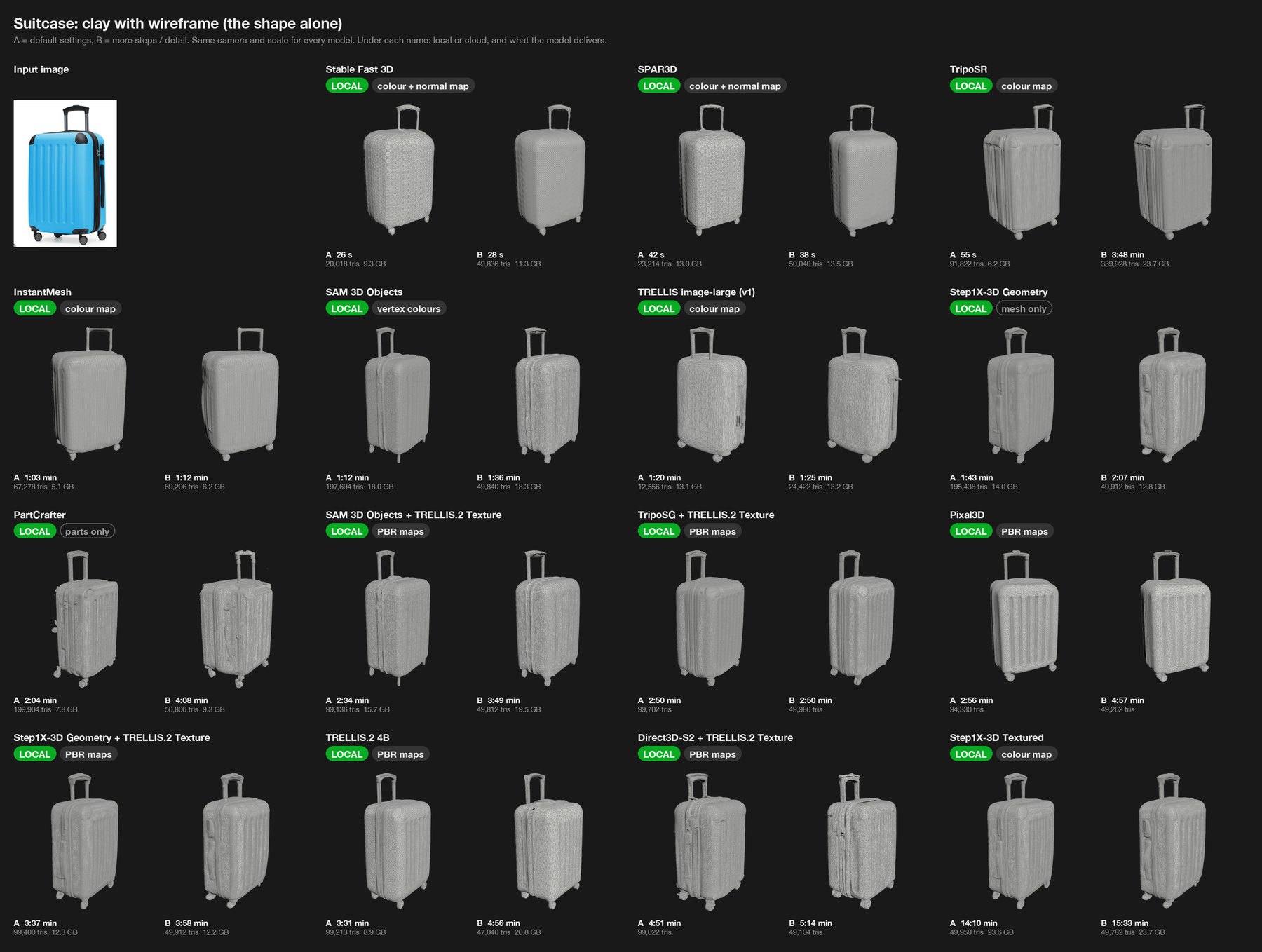
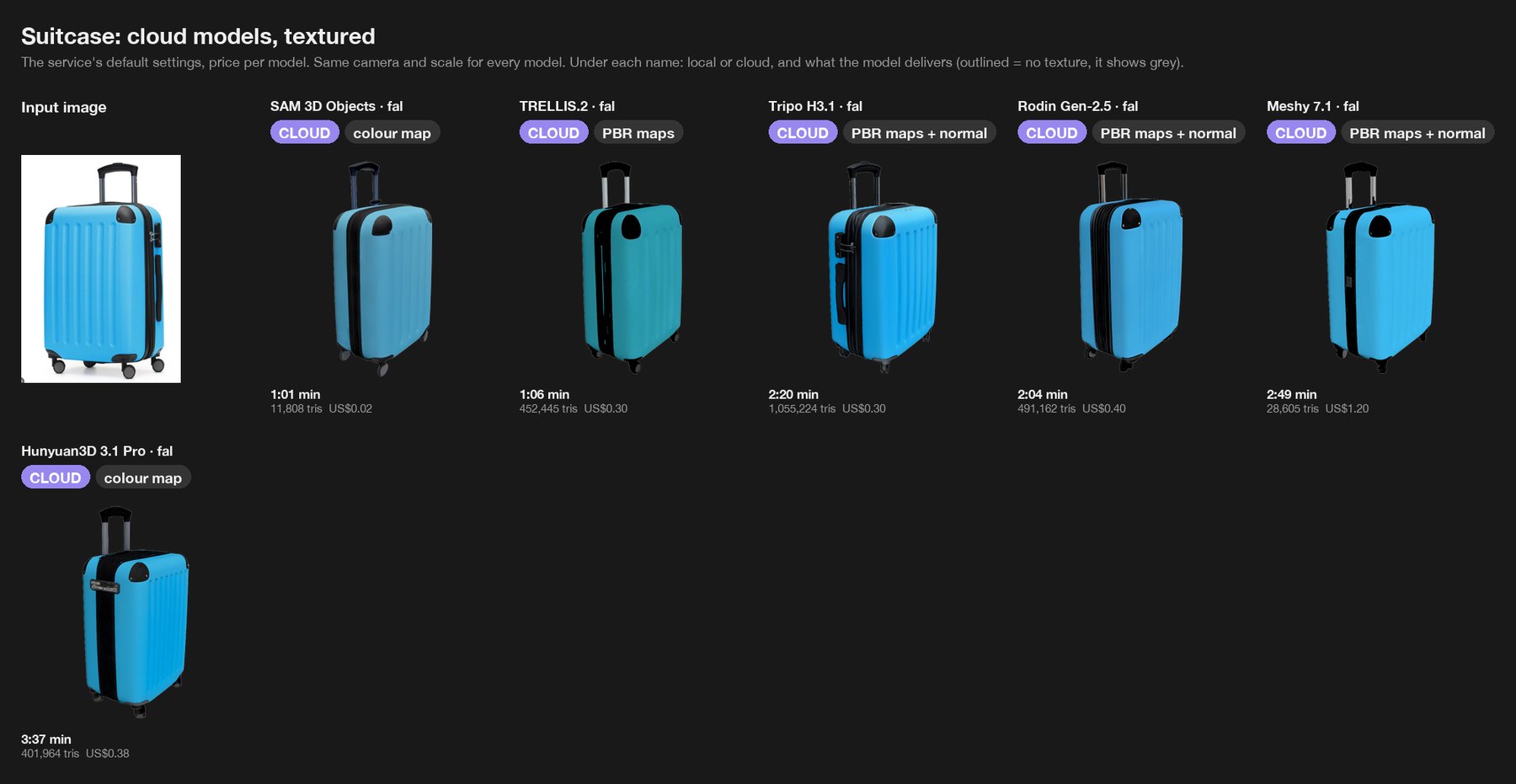
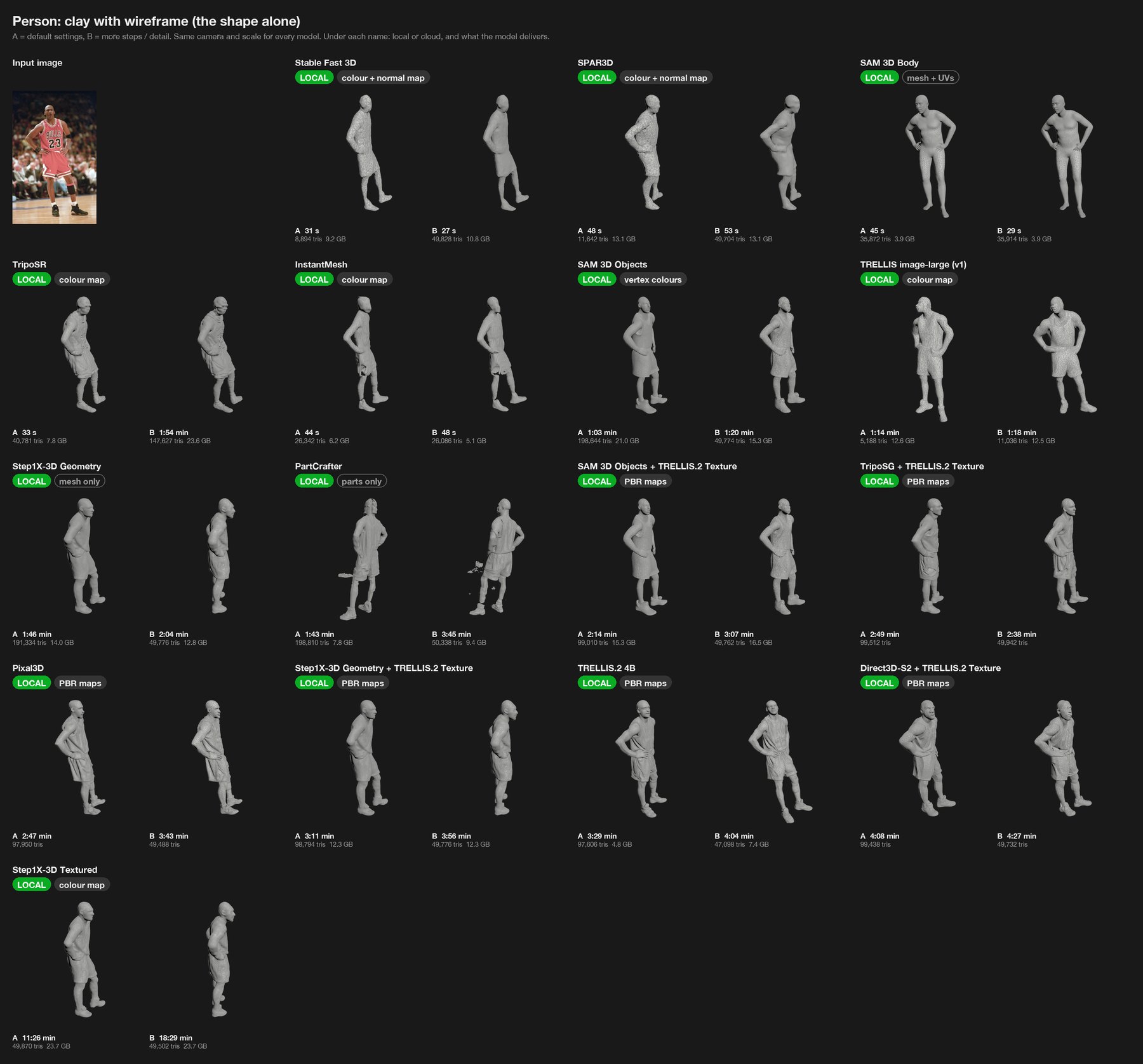
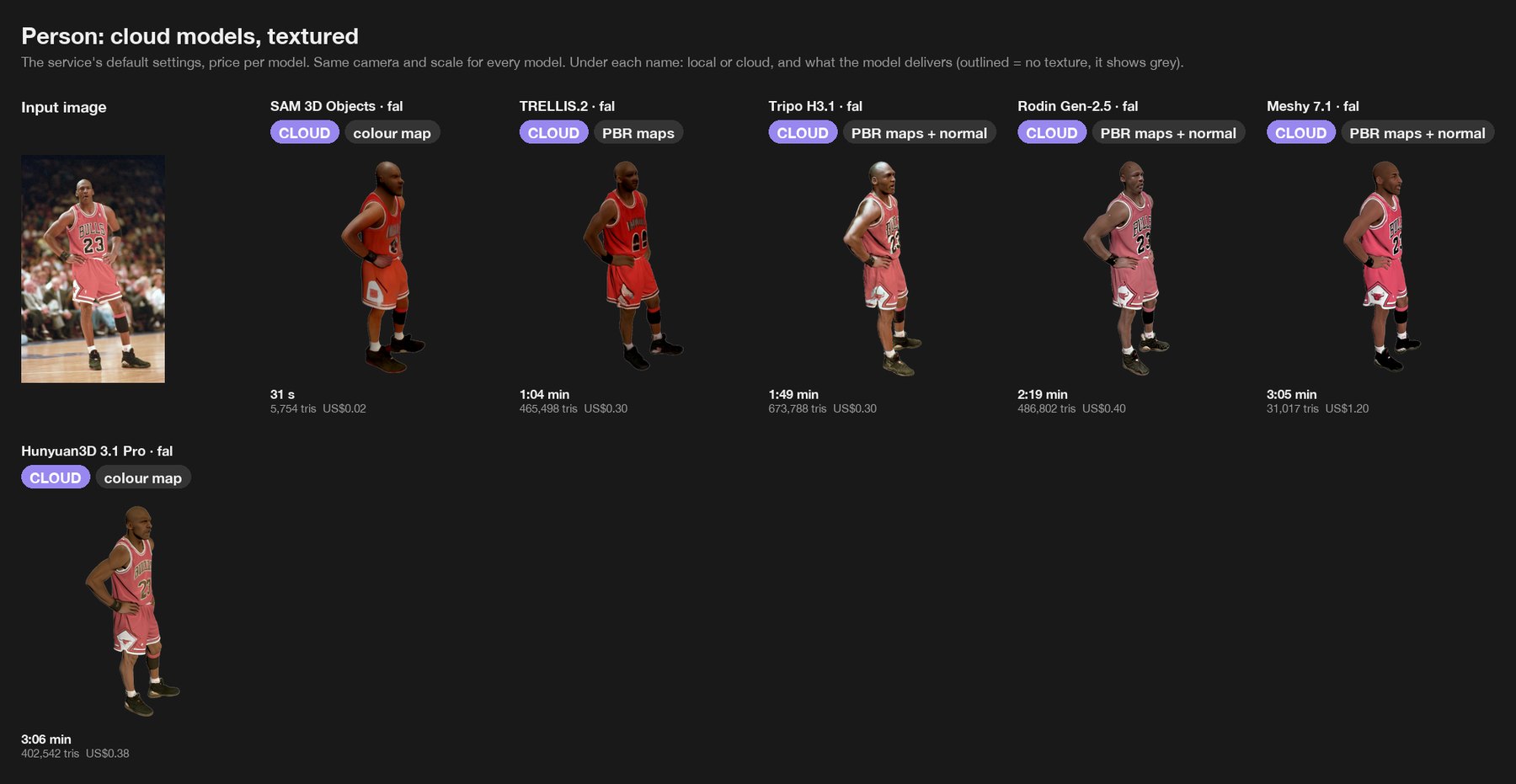
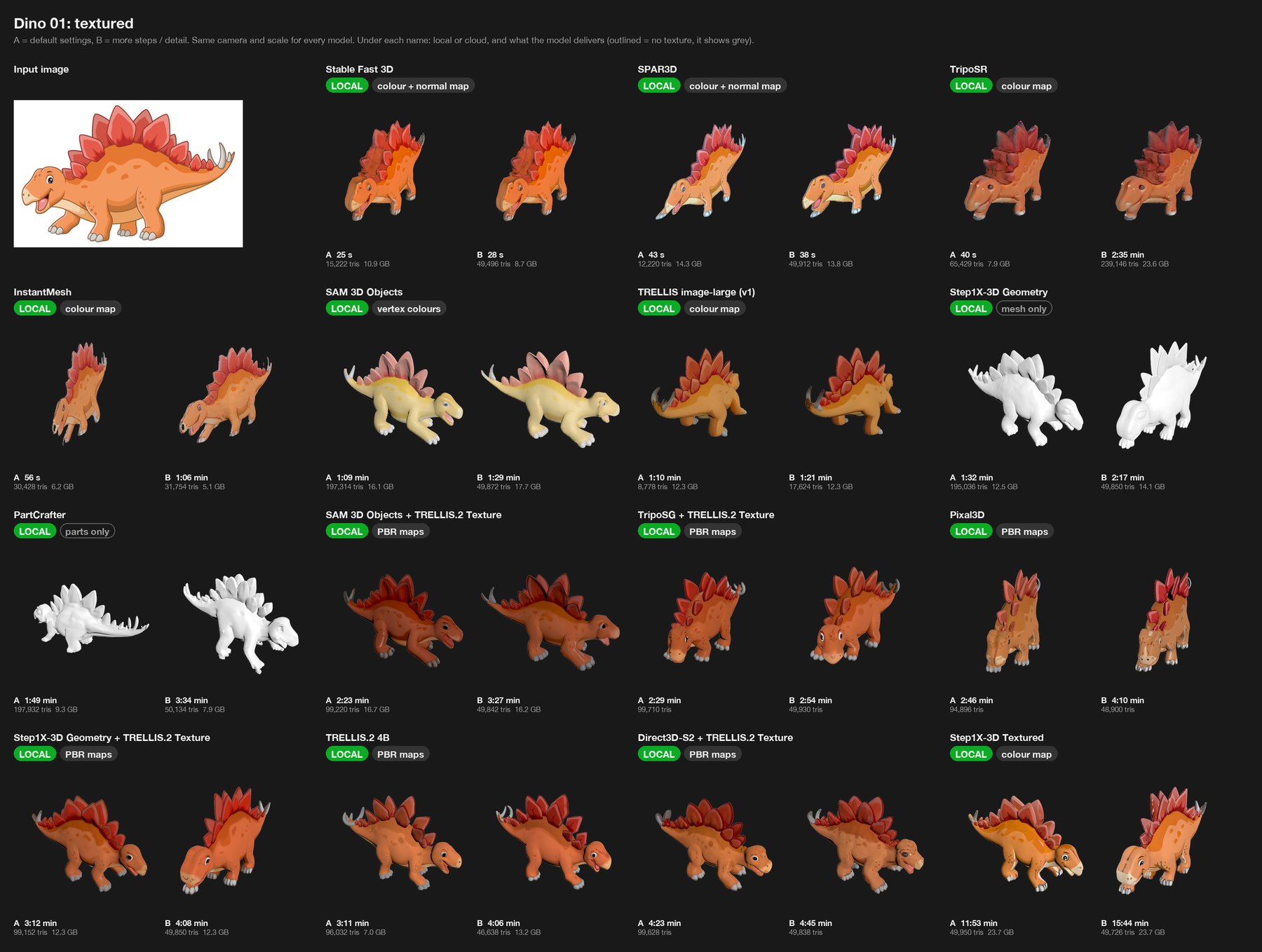
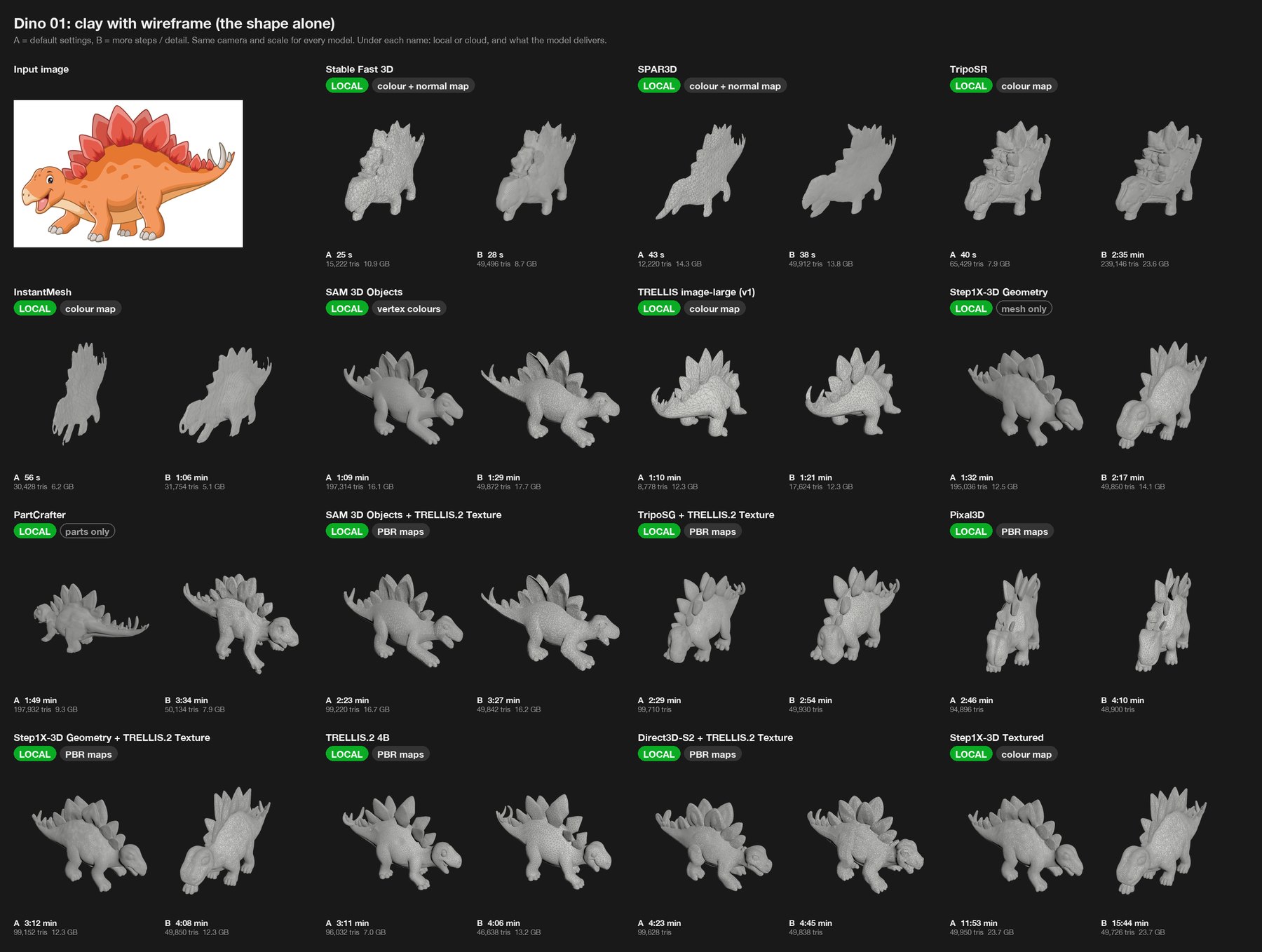
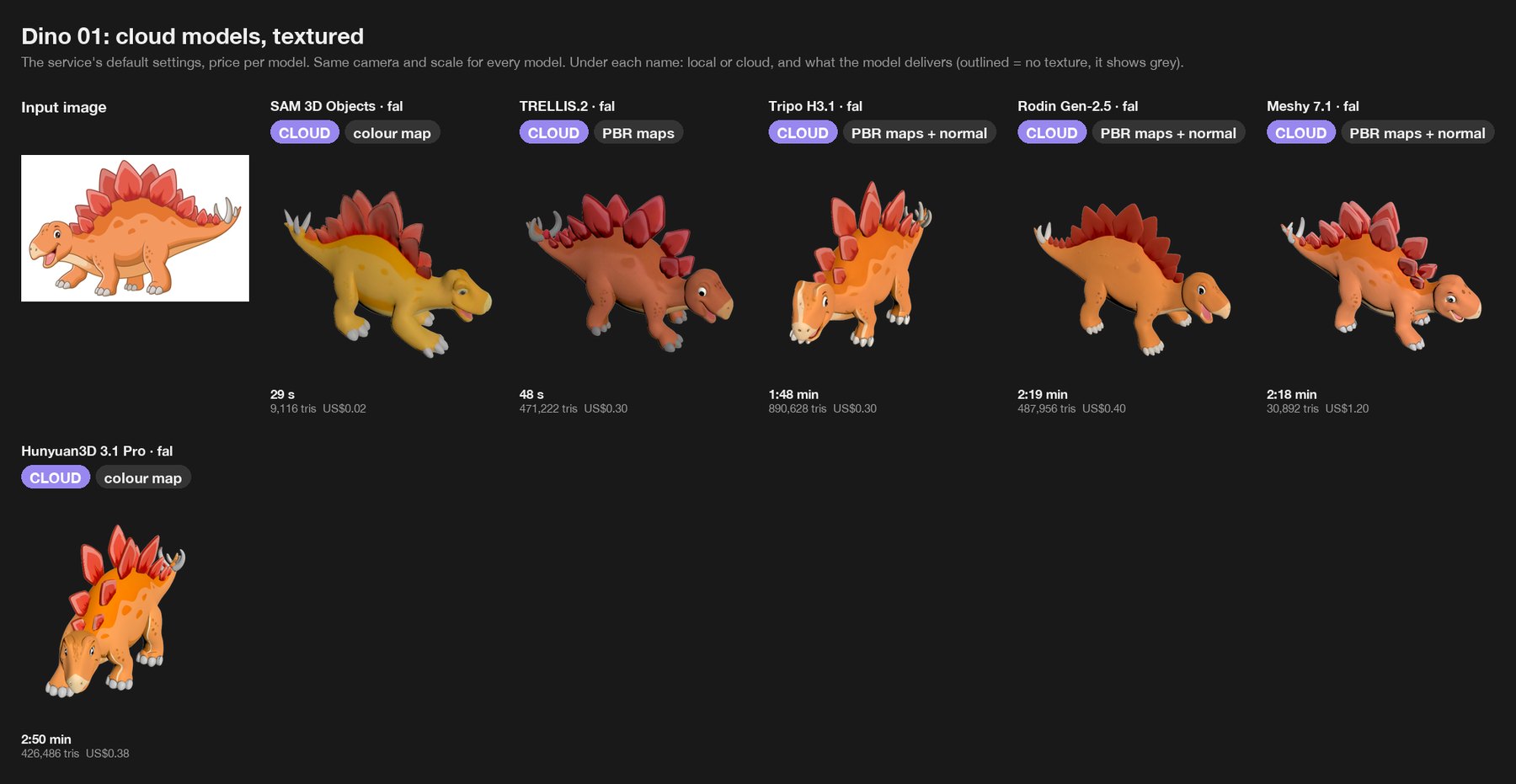
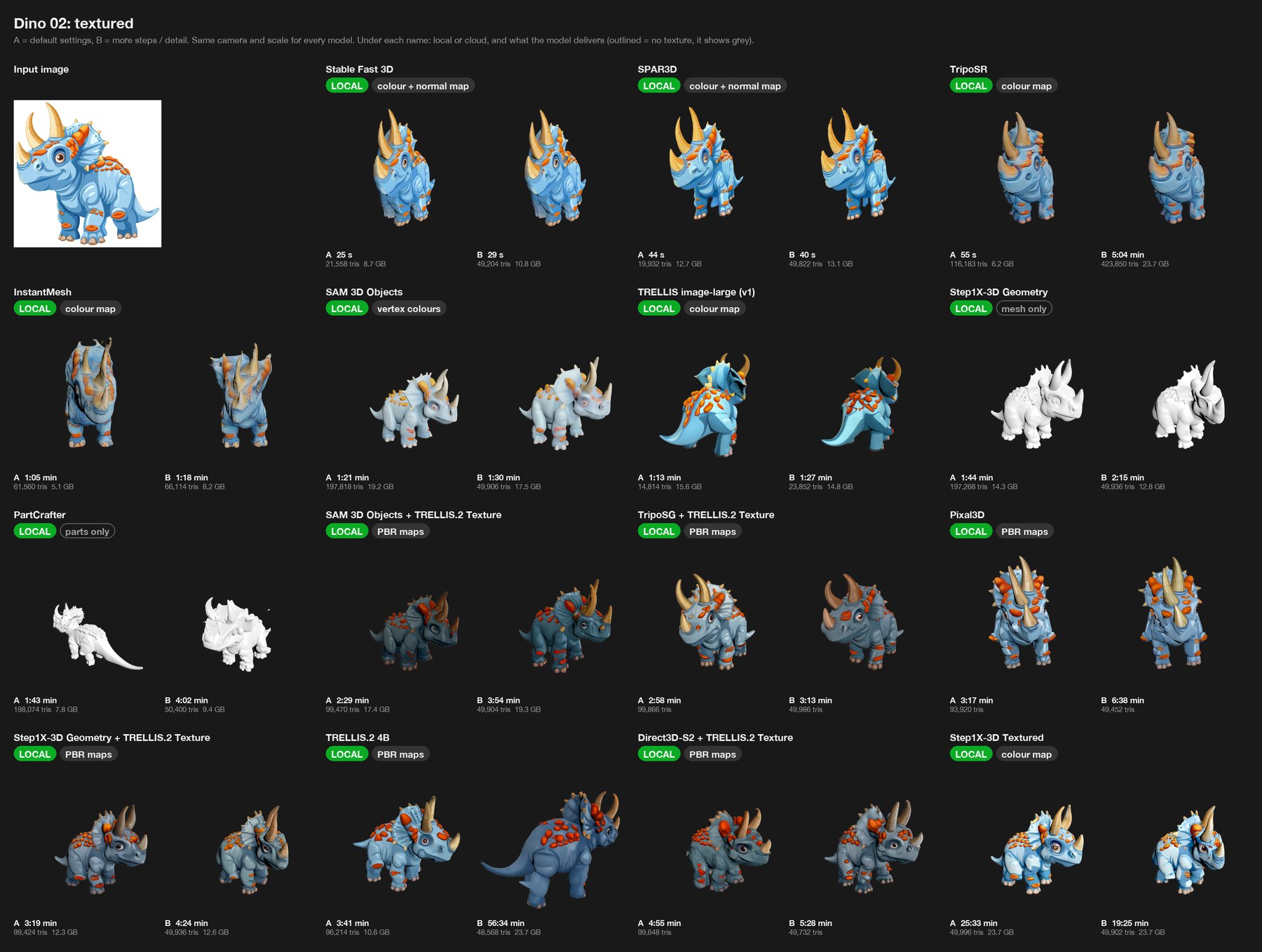
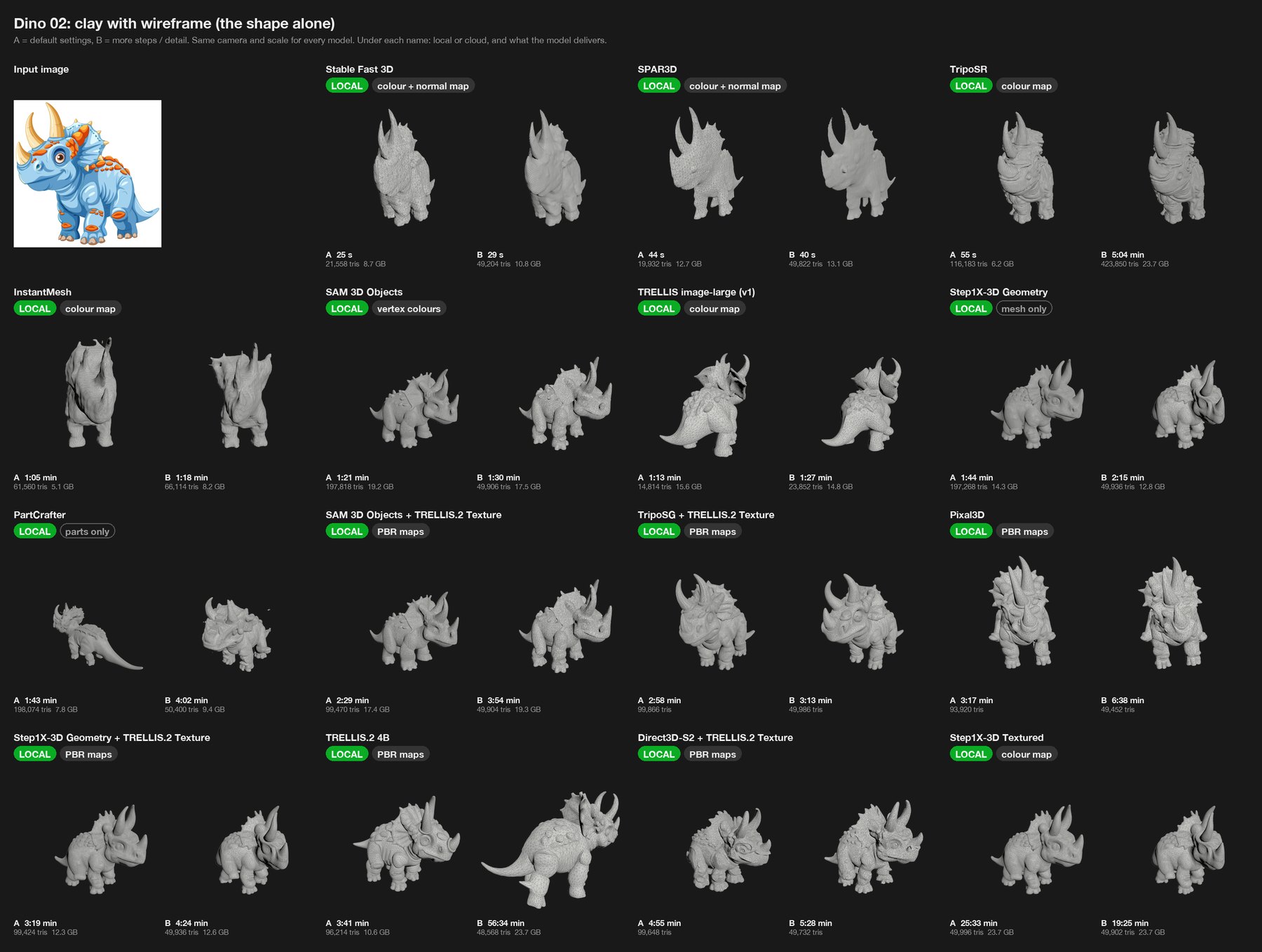
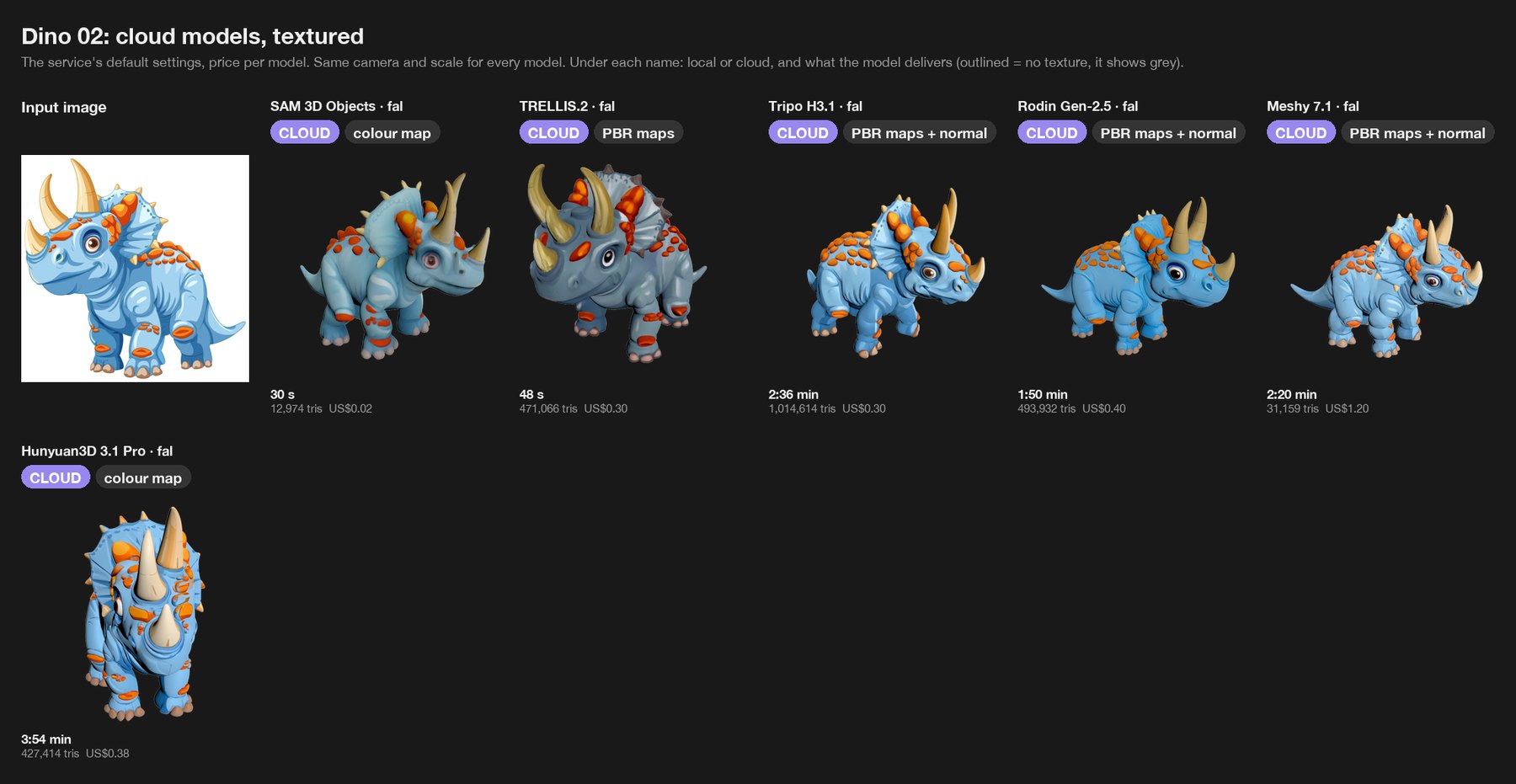
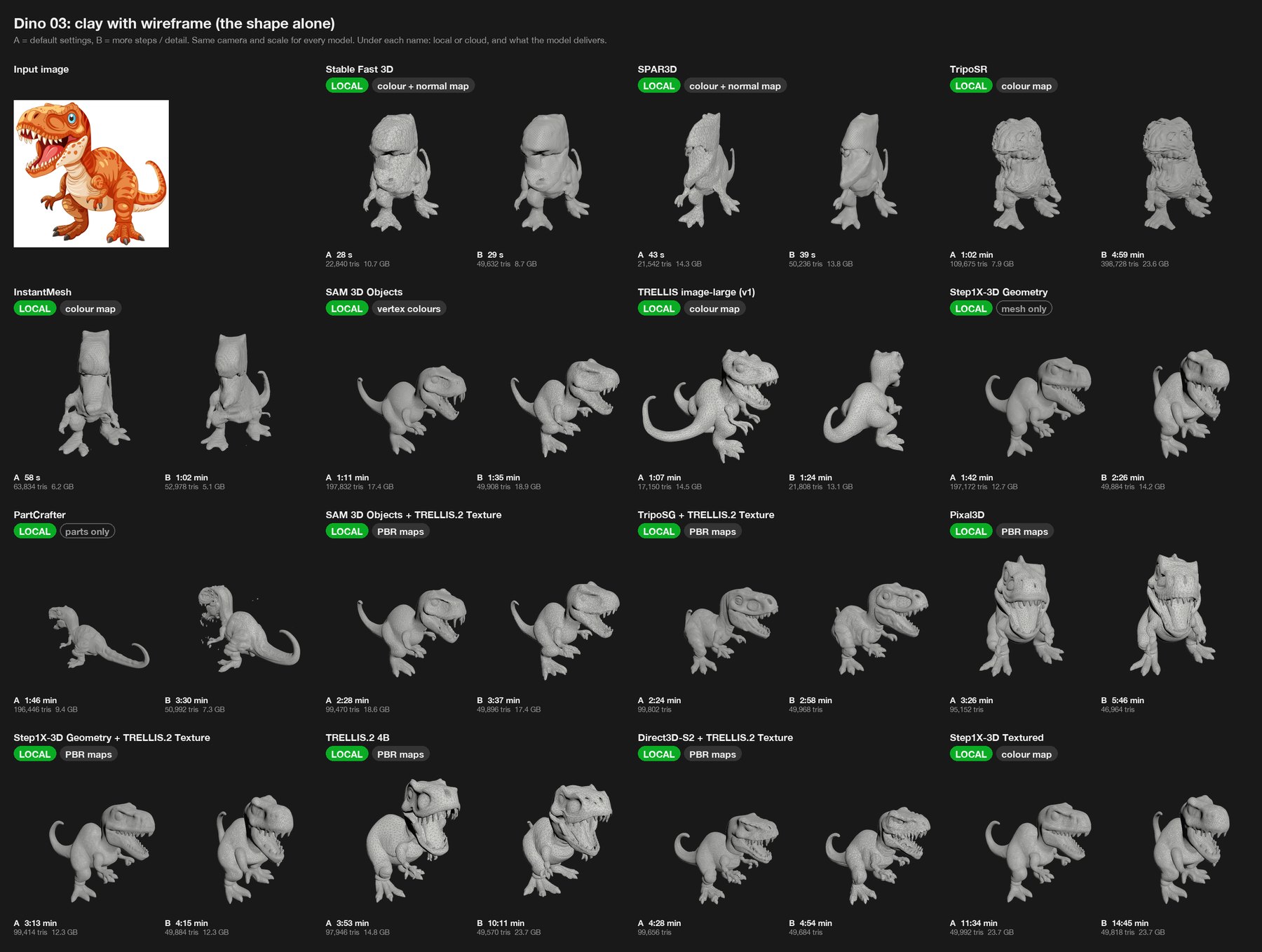
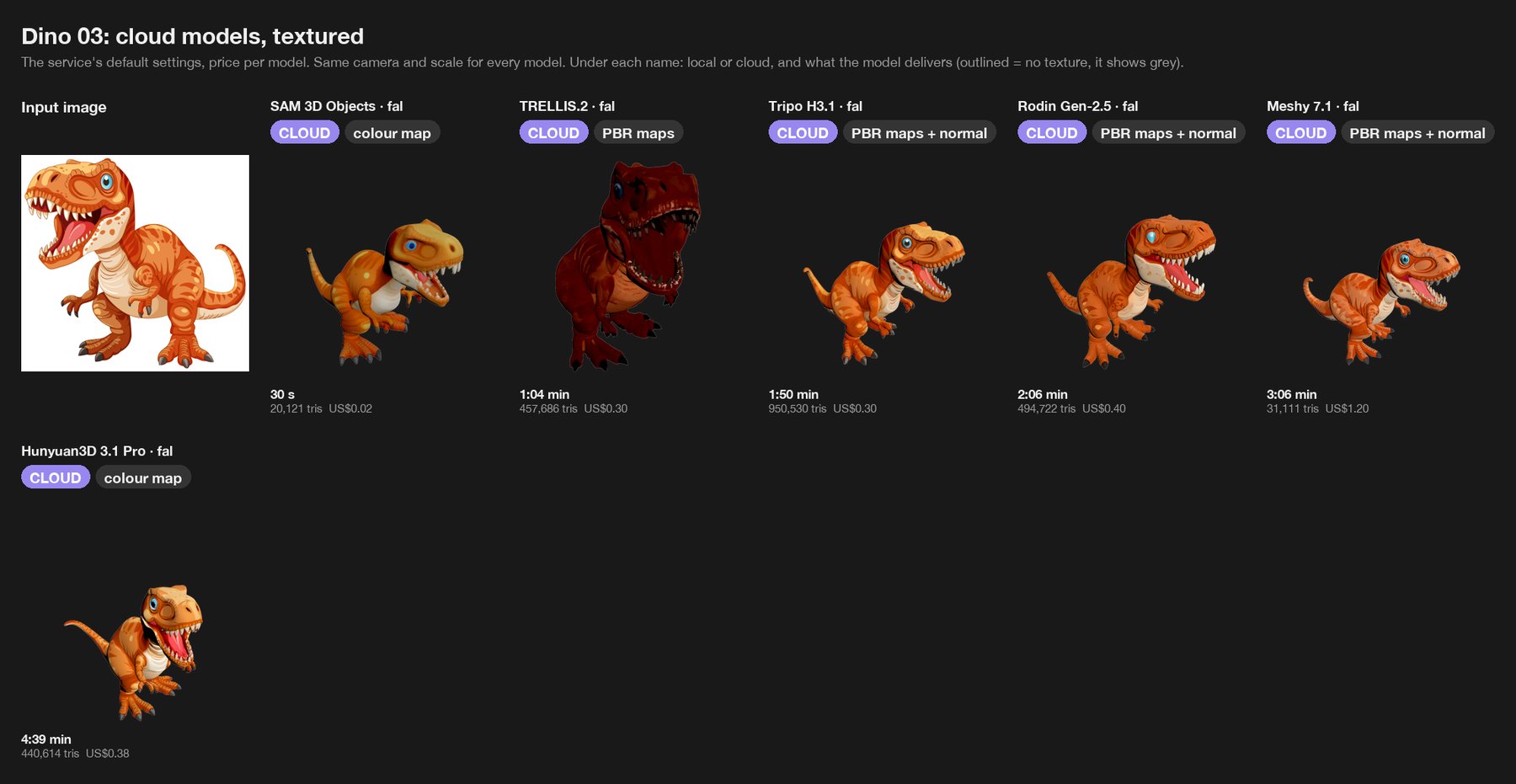
For every image there are three sheets: the local models textured, the local models as clay (grey with wireframe, the shape and topology alone) and the cloud models. OpenGL viewport captures from Houdini (not renders, see above), the same camera and scale for all, every model turned to face the camera like in the input. Local models show A and B side by side. Under each tile: time, triangles, VRAM (cloud: the price). Click a sheet for the full size.
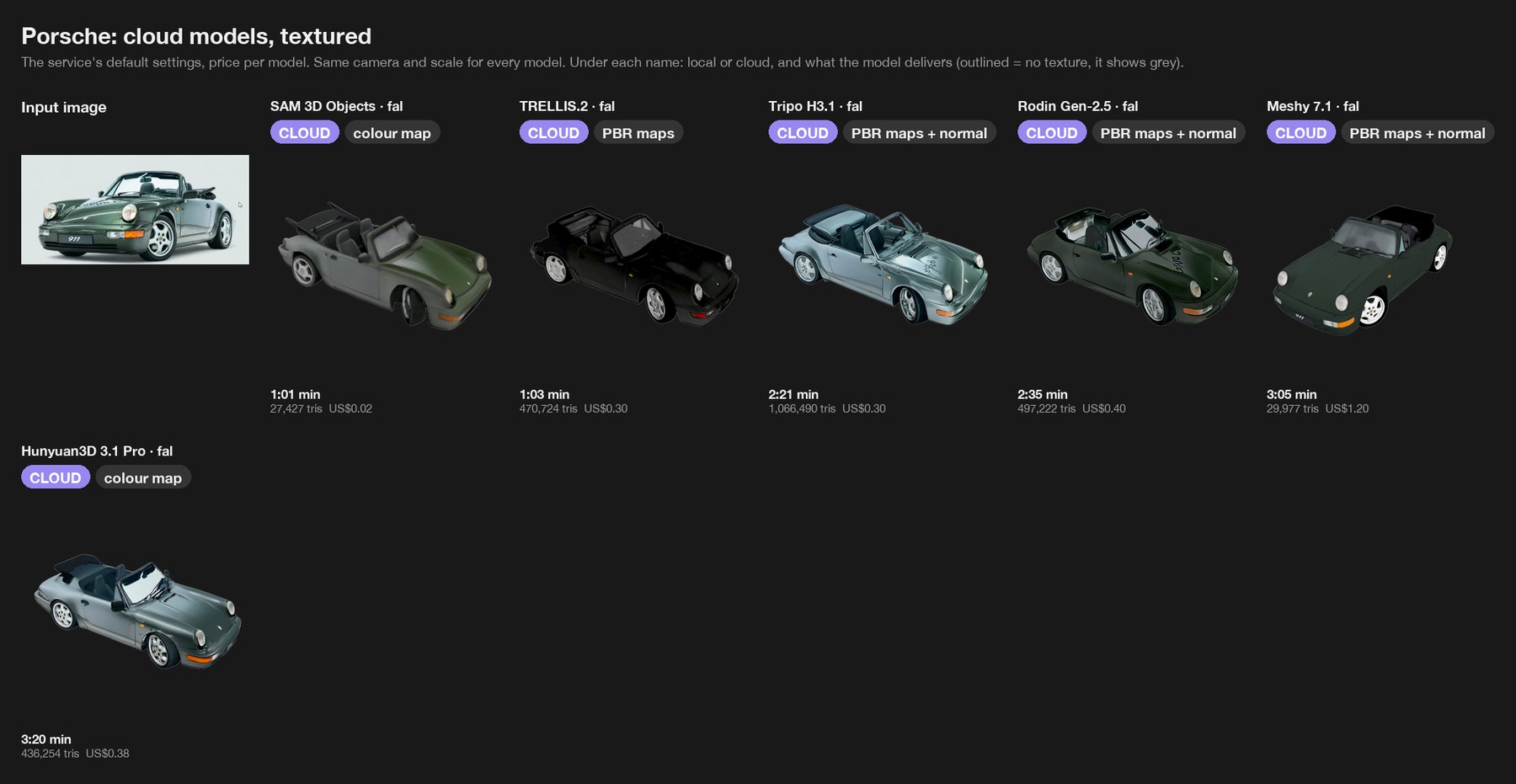
Not every model makes a texture. Under each model name there are two tags: LOCAL or CLOUD, and what the model delivers, like the Output column in the window: PBR maps (colour, roughness, metallic, some also normal), colour map, colour + normal map or vertex colours. An outlined tag (mesh only, parts only, mesh + UVs) means no texture, so these models show grey on the textured sheets too: Step1X-3D Geometry, PartCrafter and SAM 3D Body. That is not a failed run, it is what these models do. Step1X-3D Geometry and SAM 3D Objects get their texture from the TRELLIS.2 combination.
Dog
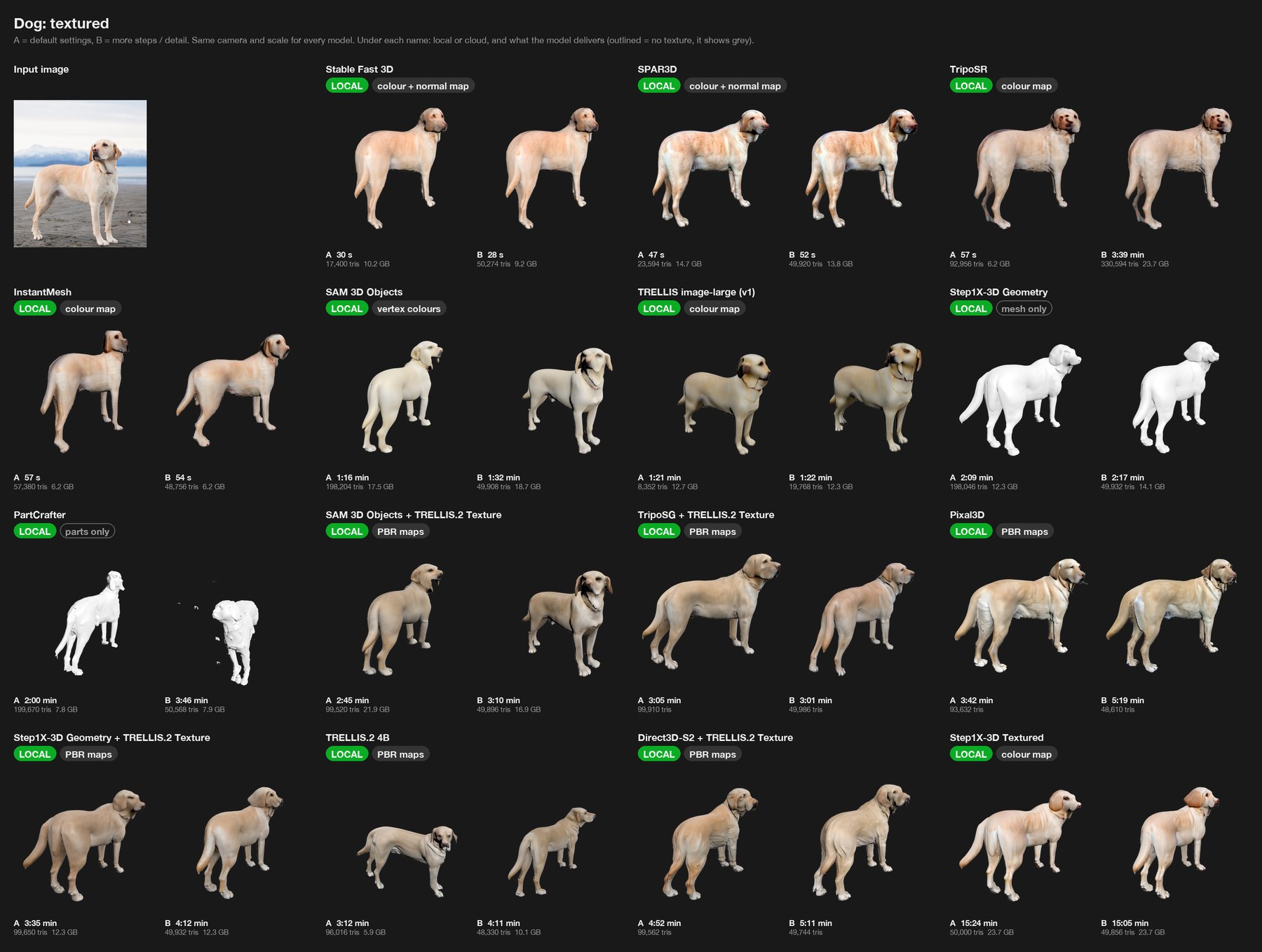
The fast models are better than their reputation, at least from the front: SF3D, SPAR3D and TripoSR get the silhouette in under a minute. The back and the depth are guessed, and the textures are blotchy (SPAR3D) or dark and smeared (TripoSR). Pixal3D sometimes leaves a small untextured patch, here a white spot on the hind leg.
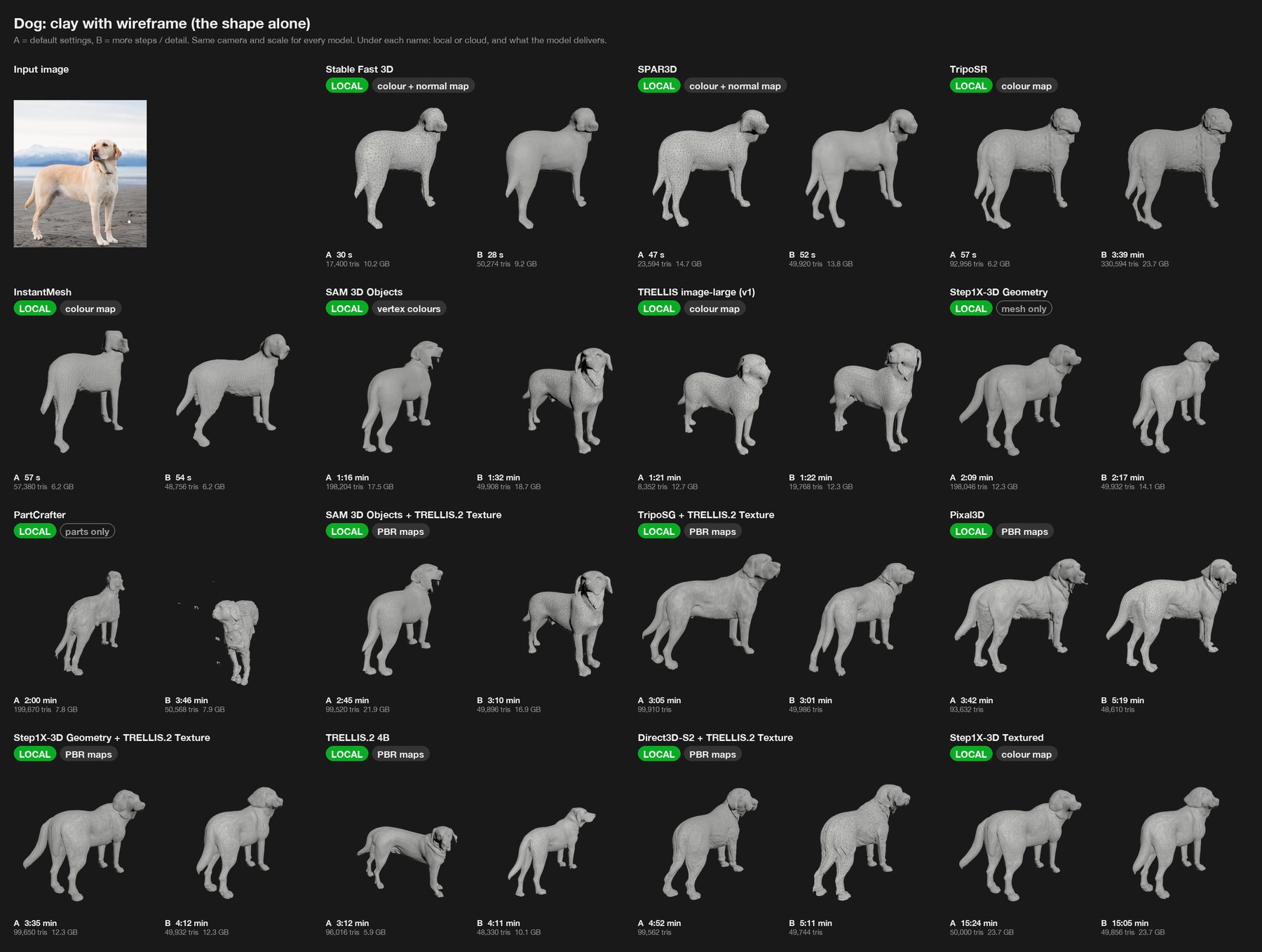
The clay view shows what the geometry models really do. PartCrafter with 8 parts splits a single object like the dog into floating shards. 4 parts are cleaner, its strength are objects that really have parts.
Porsche
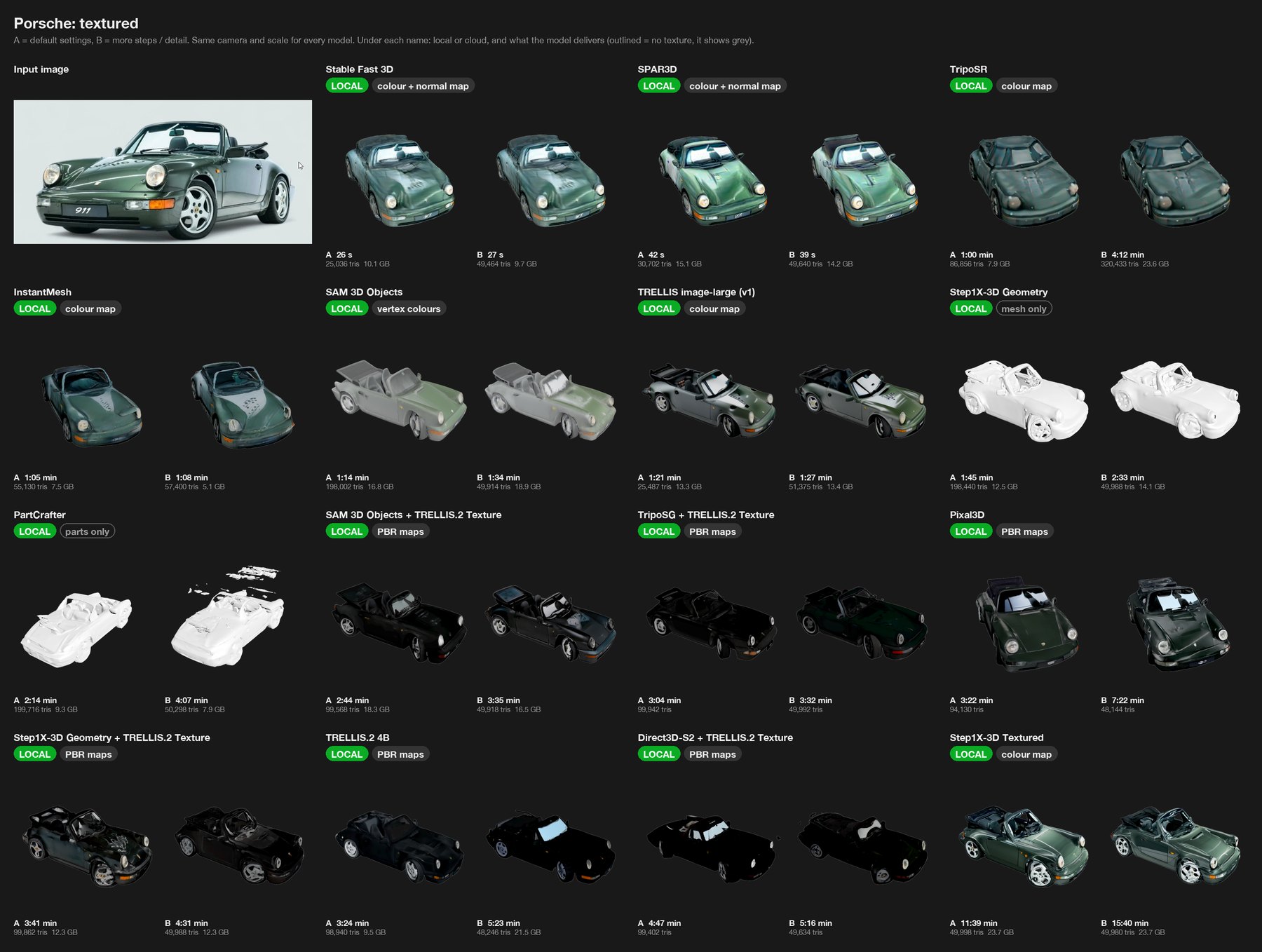
Glossy car paint is the hard case for the colours, see above: everything with the TRELLIS.2 texture stage comes out almost black.
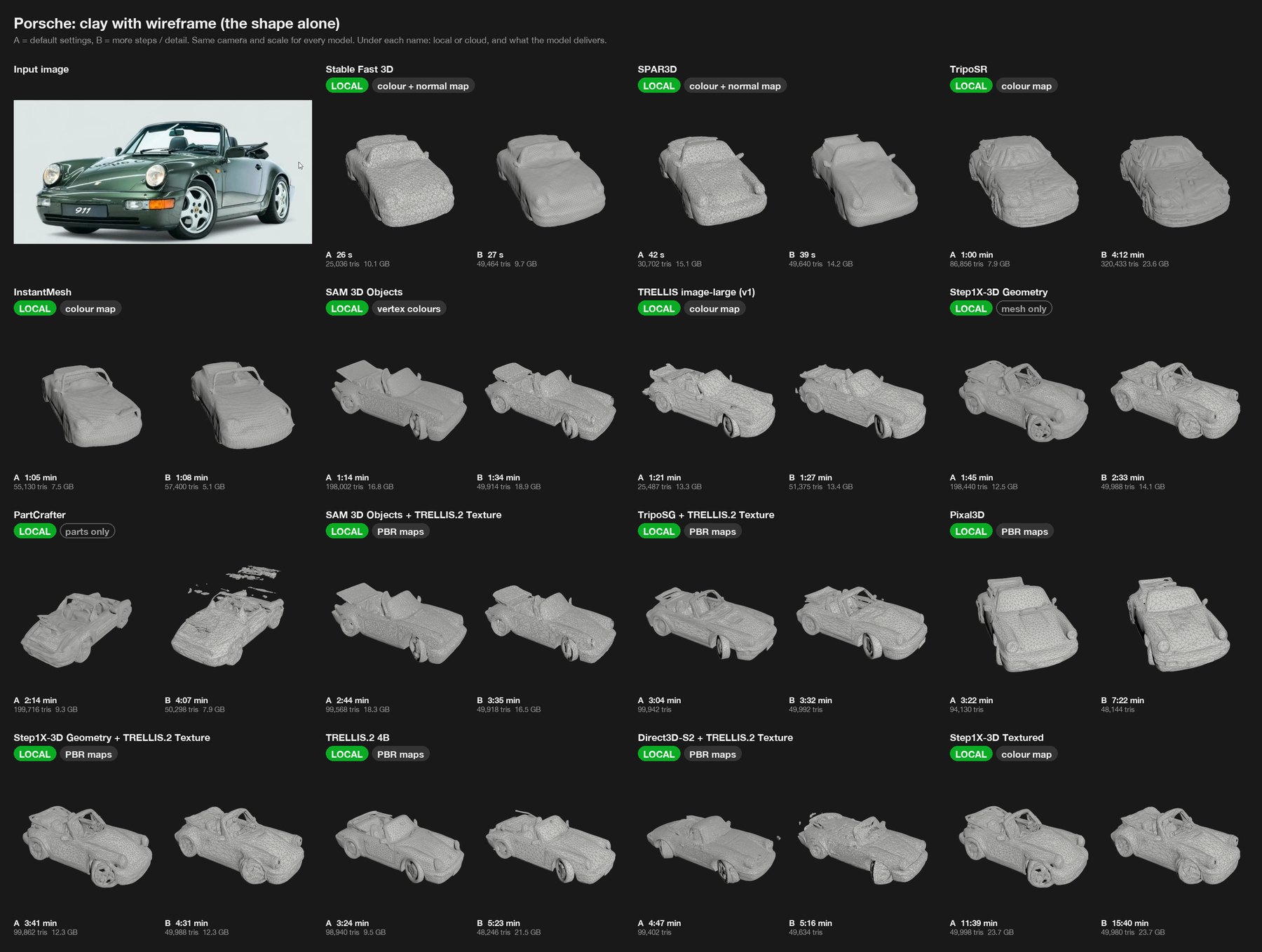
Two kinds of orientation: Pixal3D, SF3D, SPAR3D, TripoSR and InstantMesh rebuild the object as the camera of the photo saw it, the car comes out facing front left like in the photo. TRELLIS.2, the combinations, SAM 3D Objects, Step1X-3D and TRELLIS v1 put the object upright on its own axes, the car lengthwise. Both are fine, for a scene the second is easier to place.
Suitcase
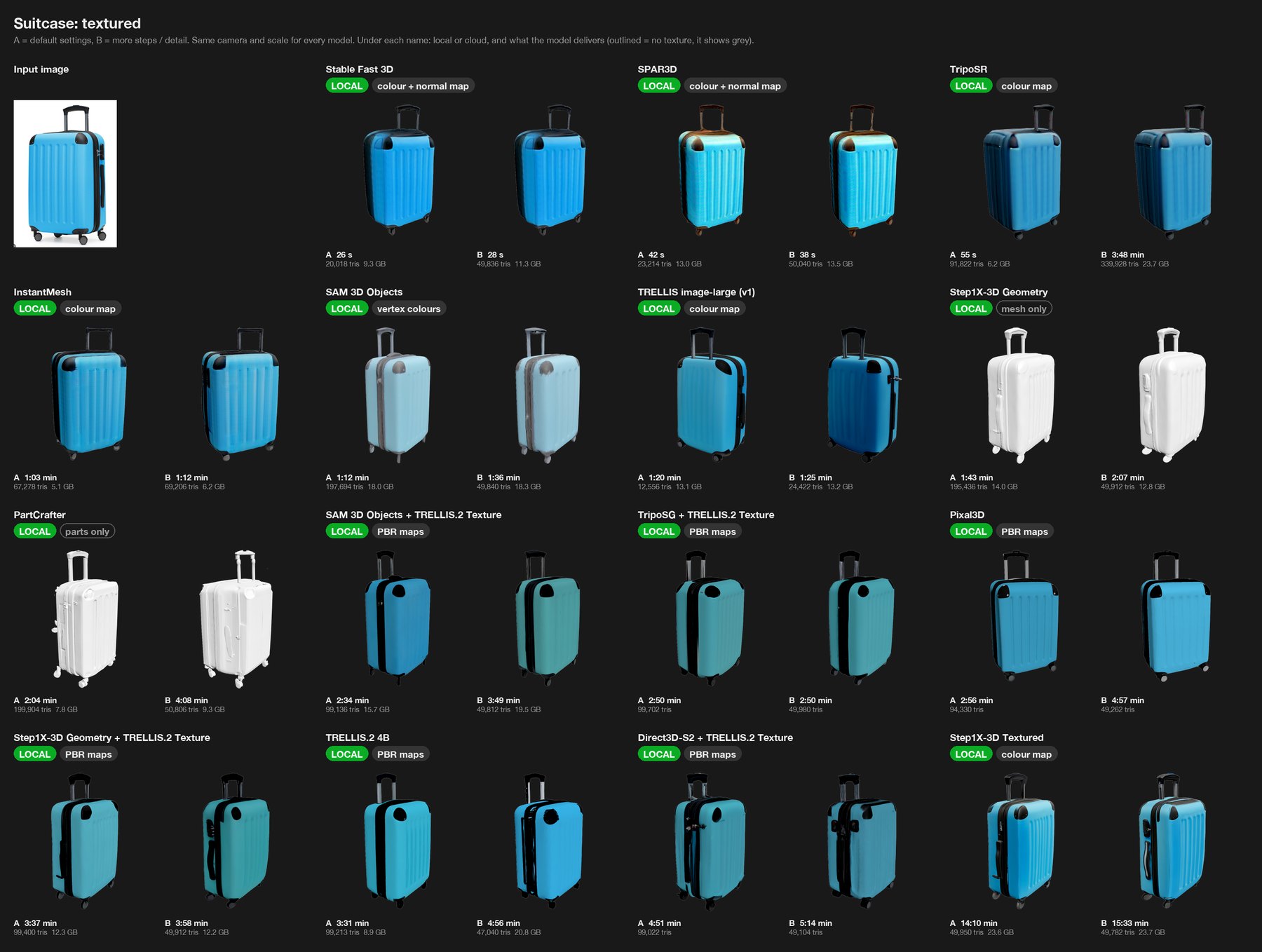
The complete assets hold the shape well, the ribs of the suitcase included. The colour shift of the TRELLIS.2 texture stage is easy to see here: sky blue turns turquoise.
Person
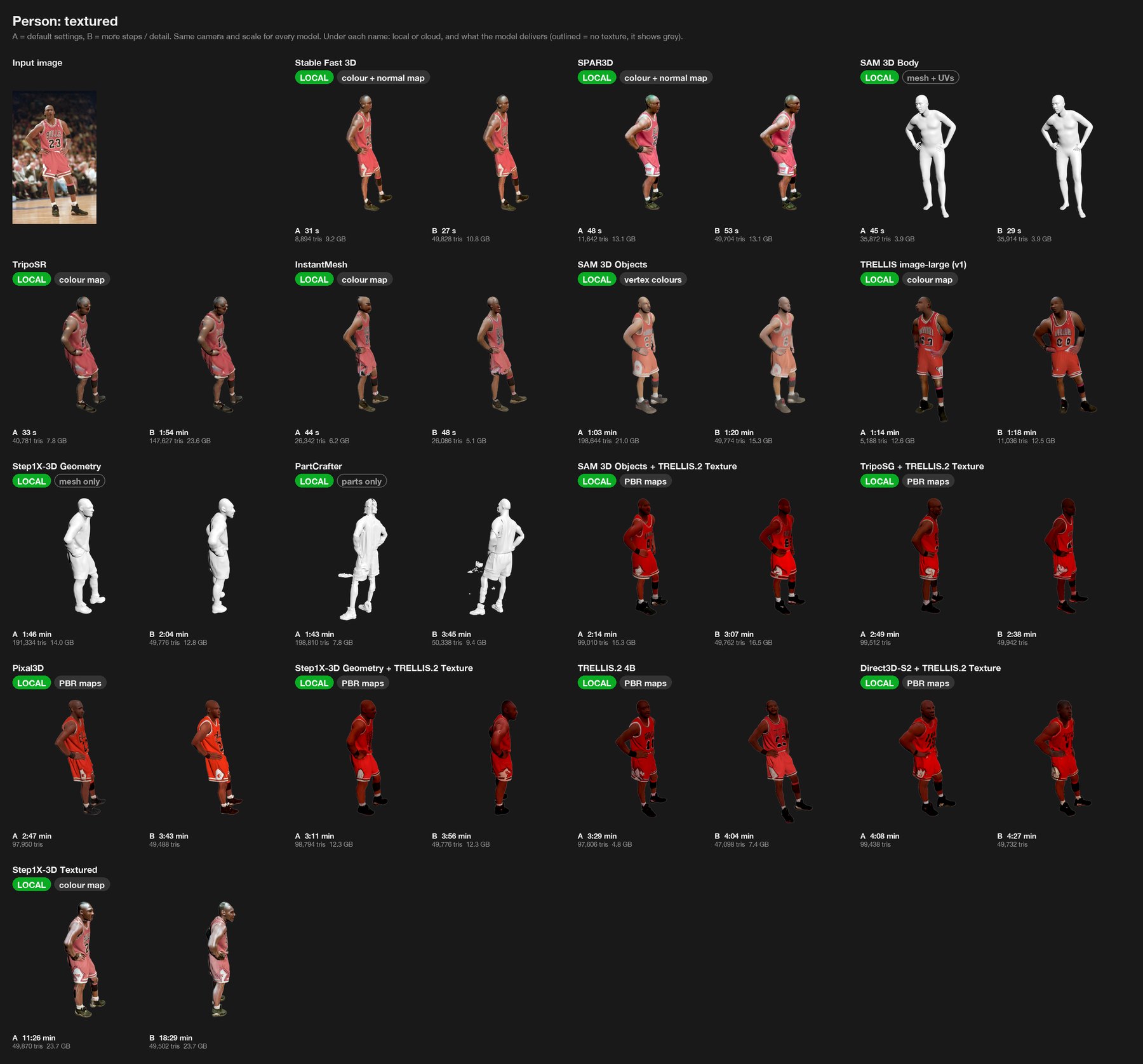
SAM 3D Body gets the pose right (hands on the hips, the weight on one leg) in 30 to 45 seconds. It is a bare body without texture, but rigged as a KineFX character, a good base mesh or pose reference.
Dino 01
Dino 02
Dino 03
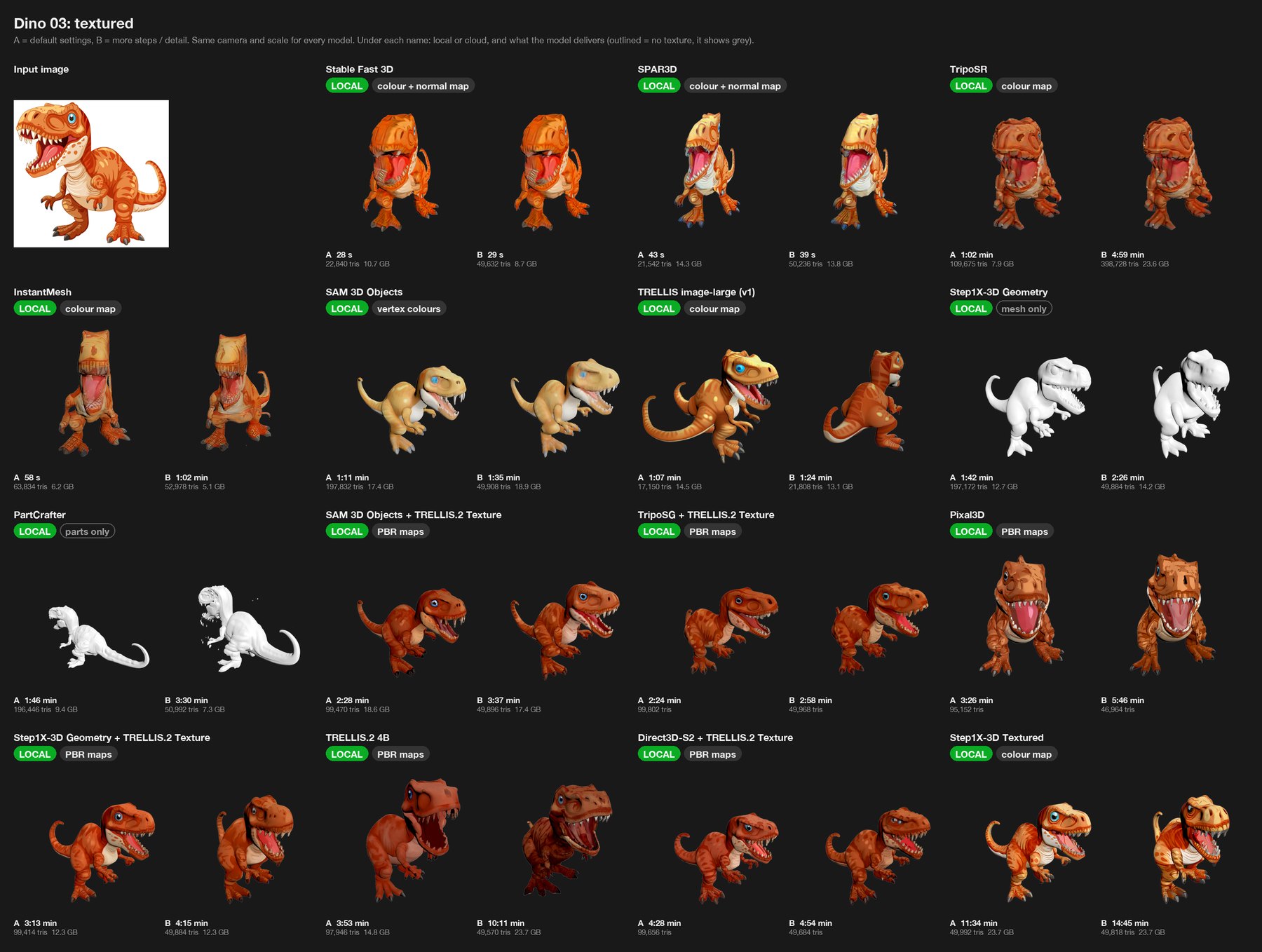
Cartoon images work well for the shape. The dinosaur plates and spikes are there in the complete assets, Step1X-3D Textured matches the colours of the input very closely, but needs 12 to 16 minutes for one colour map.
Model by model
My verdict after all the sheets, and what each model is good for. The licence note is what the ASSH shows in its model list: for local models the strictest level of the model and the parts it uses, for cloud models the terms of the service. Please read the full licence before you use a result commercially.
| Model | Runs | Verdict | Best for | Licence |
|---|---|---|---|---|
| Pixal3D | local | Best overall. The shape is very close to the picture, good textures and PBR maps; now and then a small untextured patch | hero props that must match the image | limited (MIT, DINOv3 conditions, gated); Windows and Linux only |
| TripoSG + TRELLIS.2 Texture | local | Top quality: clean, detailed shape with PBR maps in under 3 min | complete assets | limited; not licensed in the EU (TripoSG) |
| Direct3D-S2 + TRELLIS.2 Texture | local | Finest geometry detail, the slowest of the complete assets | high-poly sources, baking, 3D print | limited (MIT parts, DINOv3 conditions) |
| TRELLIS.2 4B | local | Complete PBR asset from one model, good shapes; glossy paint turns into dark metal | general props, hard surface | limited (MIT, DINOv3 conditions) |
| SAM 3D Objects (+ TRELLIS.2 Texture) | local | Clean, upright shapes, also from busy photos; own vertex colours off in hue, with the texture stage UVs and correct PBR colours | real photos | limited (SAM License, gated) |
| Step1X-3D Geometry / + TRELLIS.2 Texture | local | Good, detailed shape; the combination is the faster way to a textured result | retopo bases, textured assets | non-commercial |
| Step1X-3D Textured | local | Best colour match, but one colour map only, 12 to 16 min, fills 24 GB | when the colours must match and time does not matter | non-commercial |
| TRELLIS v1 | local | Fast textured low-poly (5k to 25k triangles), also from several views | quick textured iterations | non-commercial with the default baked texture; vertex colours or no texture for commercial use |
| PartCrafter | local | The only one that splits into parts; with too many parts single objects fall apart | kitbash pieces, rigging, RBD | limited; not licensed in the EU |
| SAM 3D Body | local | Accurate pose and body from one photo of a person in under a minute; bare body, no texture | character base meshes, pose reference | limited (SAM License); privacy law for photos of people |
| InstantMesh | local | Soft detail, a colour texture, little VRAM | small GPUs | non-commercial |
| Stable Fast 3D | local | Under 30 s, a good silhouette from the front, the back is guessed | previews, background props | limited (only below US$1M revenue) |
| SPAR3D | local | Like SF3D, blotchy textures, the depth of the back often wrong | previews | limited (only below US$1M revenue) |
| TripoSR | local | Fast and small, coarse and dark | blockouts, small GPUs | MIT (commercial) |
| TRELLIS.2 (fal.ai) | cloud | The same model as locally, about 4x faster, no 24 GB limit, about 460k triangles | TRELLIS.2 without the hardware | fal.ai Terms + MIT (TRELLIS.2) |
| Rodin Gen-2.5 (fal.ai) | cloud | All PBR maps, about 490k triangles | complete high-poly assets | fal.ai Terms (Hyper3D partner model) |
| Meshy 7.1 (fal.ai) | cloud | All PBR maps, about 30k triangles, the only game-ready count; the most expensive | real-time assets | fal.ai Terms (Meshy partner model) |
| Tripo H3.1 (fal.ai) | cloud | All PBR maps, 0.7M to 1.1M triangles | high-poly sources | fal.ai Terms (Tripo partner model) |
| Hunyuan3D 3.1 Pro (fal.ai) | cloud | Colour map, about 420k triangles | high-poly sources | fal.ai Terms (Tencent partner model) |
| SAM 3D Objects (fal.ai) | cloud | Baked texture with UVs (locally vertex colours only), 30 s, 2 cents | cheap tests from real photos | fal.ai Terms + SAM License |
| Stable Fast 3D / SPAR3D (Stability) | cloud | 6 s, as coarse as the local ones | previews without a GPU | Stability AI Terms of Service |
| Hitem3D 3.0 (3D AI Studio) | cloud | About 1M triangles, slow; one run only (trial credits) | not enough runs for a verdict | 3D AI Studio API Terms + Hitem3D terms |
A few more things worth knowing:
- Every model faces another way. The same dog comes out facing forward, backward or sideways depending on the model. The ASSH matches the size of every result, the orientation stays as the model made it.
- Several views: TRELLIS v1 took the 4 Porsche views in about the same time as one image (66 s with defaults).
- Triangle counts: with defaults from about 5k to 25k (TRELLIS v1, SF3D, SPAR3D) up to about 200k (SAM 3D Objects, Step1X-3D, PartCrafter). Setting B caps most at 50k.
- Two GPUs, twice the output. One job per GPU in parallel worked without problems for all 172 benchmark runs.
And the cloud?
For comparison I ran the same 7 images through 9 cloud models the ASSH supports, 49 runs with the default settings of each service and real API keys, timed from the upload to the downloaded model. Stable Fast 3D, SPAR3D and Hitem3D ran only once each, so take their numbers as a first look.
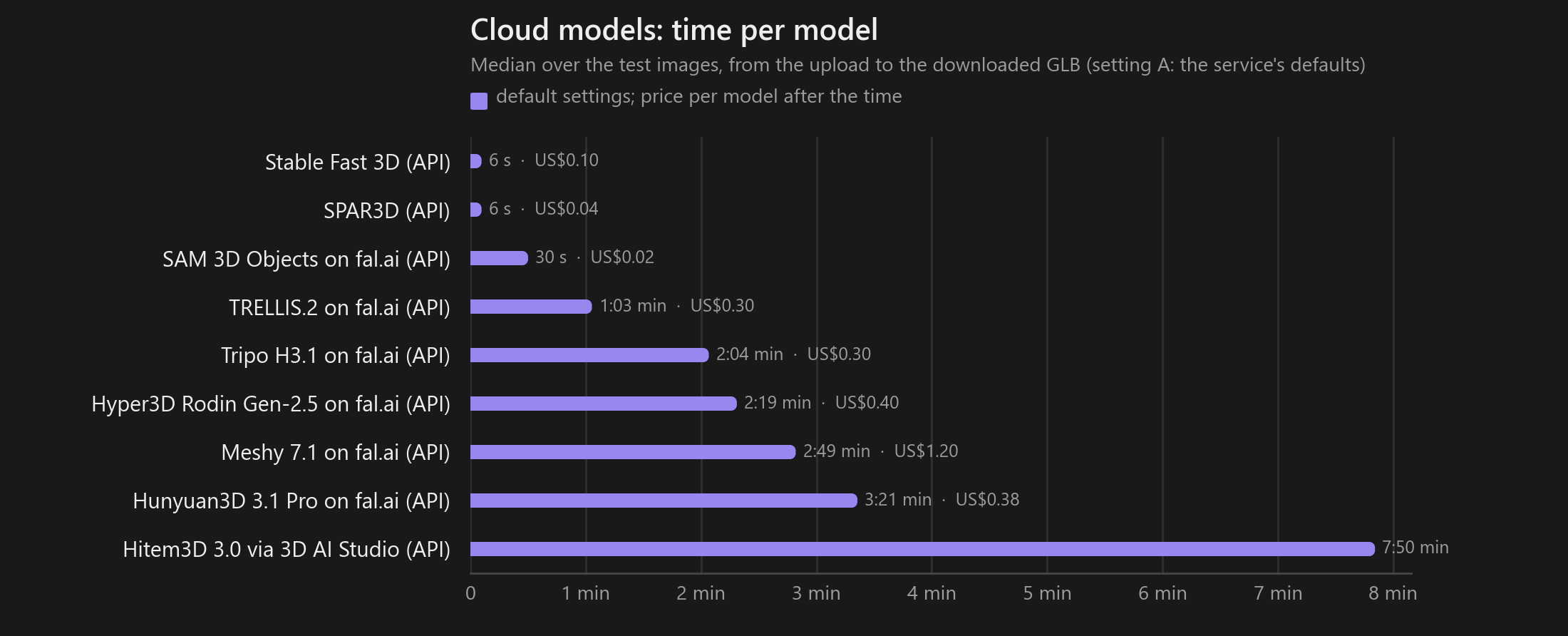
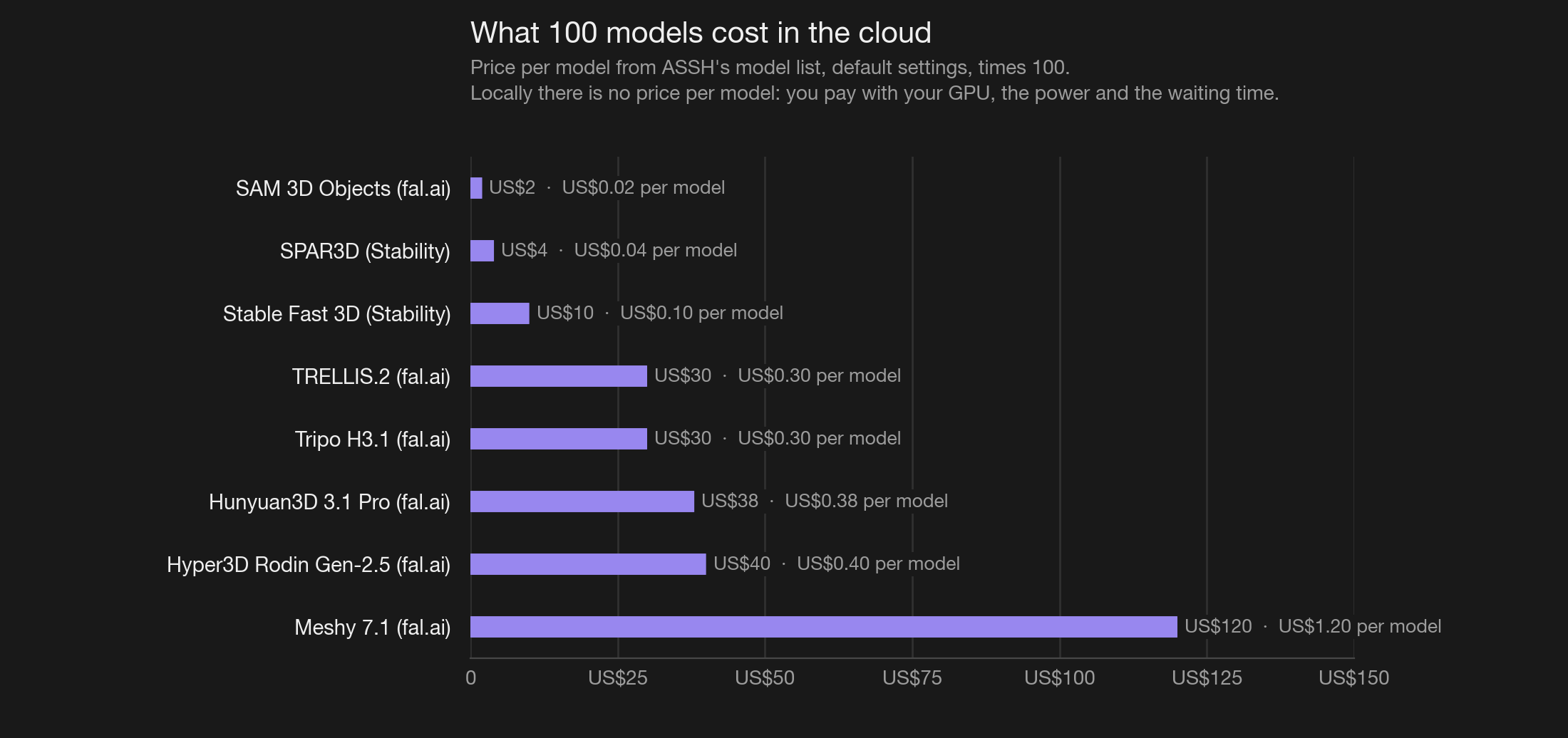
| Model | Time (median) | Price | Triangles | Notes |
|---|---|---|---|---|
| Stable Fast 3D / SPAR3D (Stability) | 6 s | US$0.10 / 0.04 | 19k / 25k | as coarse as the local ones |
| SAM 3D Objects (fal.ai) | 30 s | US$0.02 | 6k to 27k | baked texture with UVs (locally vertex colours only) |
| TRELLIS.2 (fal.ai) | 63 s | US$0.30 | about 460k | the same model as locally, about 4x faster, no 24 GB limit |
| Tripo H3.1 (fal.ai) | 124 s | US$0.30 | 0.7M to 1.1M | all PBR maps |
| Rodin Gen-2.5 (fal.ai) | 139 s | US$0.40 | about 490k | all PBR maps |
| Meshy 7.1 (fal.ai) | 169 s | US$1.20 | about 30k | the only game-ready count, all PBR maps |
| Hunyuan3D 3.1 Pro (fal.ai) | 201 s | US$0.38 | about 420k | colour map |
| Hitem3D 3.0 (3D AI Studio) | 471 s | 150 credits | about 1M | one run (trial credits) |
The cloud results of every test image are in the section above, next to the local ones.
Best local against best cloud
The two that are rated 5 / 5 and fit most jobs, side by side: TripoSG + TRELLIS.2 Texture on my own RTX 3090 and Rodin Gen-2.5 on fal.ai, both with default settings, each textured and as clay.
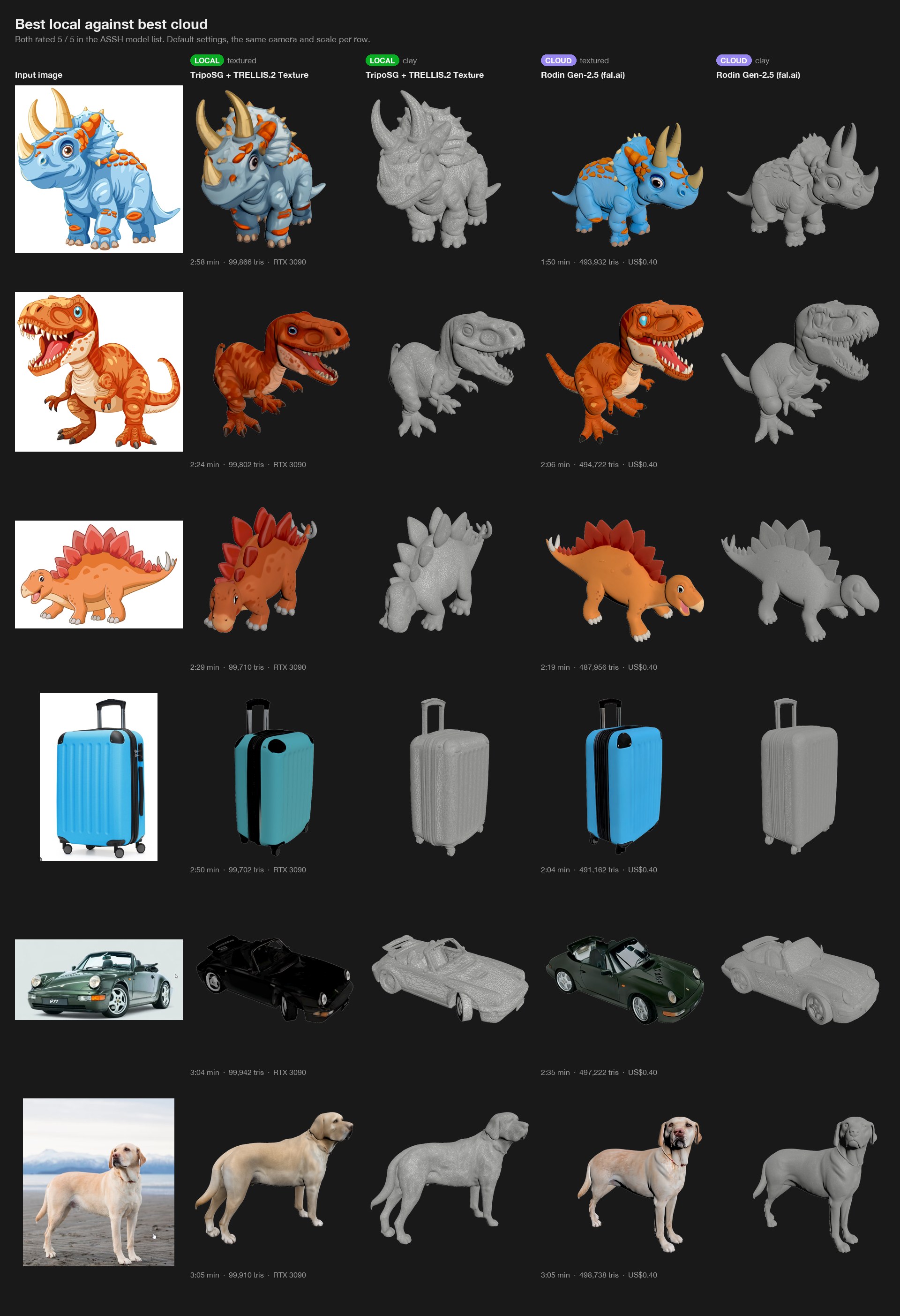
- Colours: the cloud wins clearly. Rodin keeps the bright blue, the orange, the sky blue suitcase and the green Porsche. Locally the TRELLIS.2 texture stage shifts them, the Porsche turns black.
- Shape: close. Both get the silhouette and the details like horns, teeth, plates and the ribs of the suitcase. In the clay view the local surfaces show a fine grain, Rodin is smoother.
- Mesh: locally about 100k triangles, Rodin about 490k. For real-time use the local mesh is the lighter start, the cloud one needs a reduction.
- Time and cost: about 2.5 to 3 minutes locally for nothing per model, about 2 minutes in the cloud for US$0.40, and the picture goes to the service.
Local against cloud is a trade: hardware, time and licences on one side, a few cents up to a dollar per model and an upload of your picture on the other. The high-poly cloud results (400k to 1M triangles) need a reduction for real-time use, Meshy aside. Several services also take more than one view (Tripo, Rodin, Meshy and Hunyuan got the 4 Porsche views).
Conclusion
What I would look at first, locally, from this test:
- Complete assets: Pixal3D or TripoSG + TRELLIS.2 Texture, 3 to 3.5 minutes on a 3090.
- Real photos: SAM 3D Objects + TRELLIS.2 Texture.
- Geometry for your own retopology or baking: Direct3D-S2 or Step1X-3D (non-commercial).
- Quick previews and blockouts: Stable Fast 3D in under 30 seconds.
- Special jobs: PartCrafter for parts, SAM 3D Body for people.
Running it all locally works well on a 24 GB card, as long as you stay at the defaults of the big models. Nothing leaves your machine and there is no price per model. The cloud is faster for some models and has no VRAM limit, but you pay per model and you upload your picture.
Note: tested on Windows only. Image to Model is written for Windows, Linux and macOS, but the local runtimes in this test were built and run on Windows. All times and VRAM numbers are from the machine above.
Image to Model comes with version 1.30.0 of the Houdini Asset Handler.