ASSH = AssetHandler
Library types HDRI_PolyHaven and HDRI_ambientCG. Both may use the same folder. The HDRIs appear in the HDRI tab.
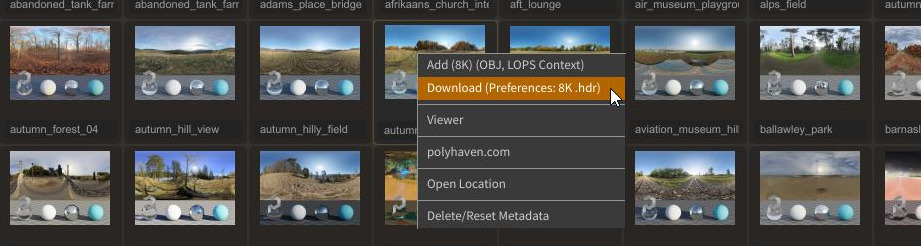
- Add (size format) (OBJ, LOPS Context): downloads the HDRI if needed and creates the dome light
- Download (Preferences: …): only downloads, in the size and format from the Preferences
- Double-click an HDRI while a dome light is selected: the map is downloaded and replaced in the light
- Viewer and the website of the source
In Preferences > API > HDRI you choose the format (.exr, .hdr) and the size (1K to 16K). ambientCG can also download a tone mapped .jpg. When you change size or format, the ASSH scans the HDRI folder again so the file names stay in sync.