ASSH = AssetHandler
Main library
Preferences > Libraries > Asset Library Anchor ($ASSET_LIB) is your main library. The ASSH sets the Houdini variable $ASSET_LIB to this path and writes it into the file paths of the nodes it creates, so a scene keeps working when the library moves and the variable points to the new place.
If the folder is empty, the ASSH creates one subfolder per asset type:
hda hdri hdri_lights proxy aixterior megascans textures shaders models kitbashes USD _substance_bridge
Additional libraries
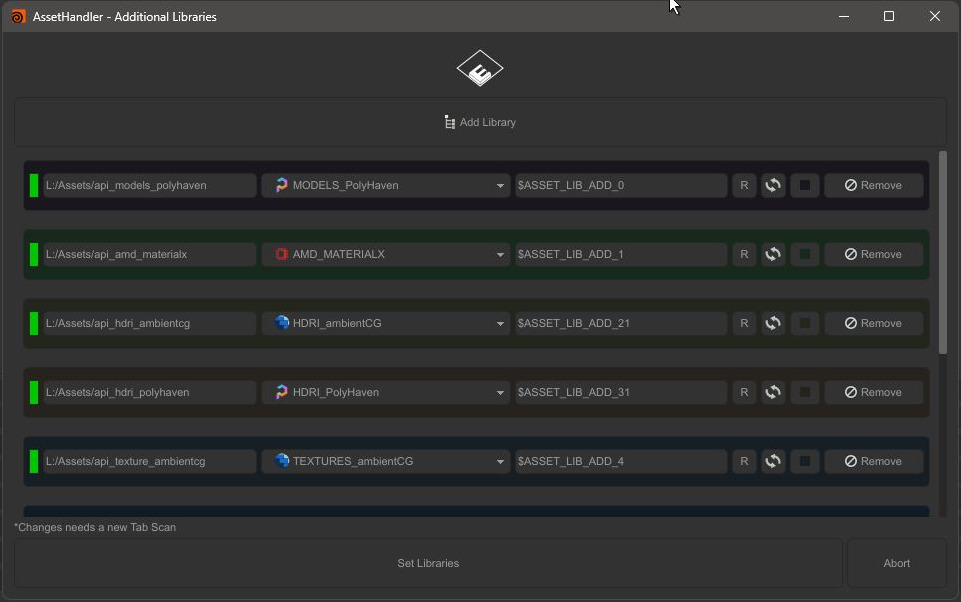
[ Add/Remove Additional Libraries ] opens an editor for more library folders, for example a Megascans download folder, a shared studio library or one folder per API source. Every entry has:
- Path: the folder
- Type: the asset type, which decides in which tab the library appears (see the table below)
- Variable: its own Houdini variable,
$ASSET_LIB_ADD_0,$ASSET_LIB_ADD_1and so on. Rename it with R; the ASSH updates the paths in the metadata. - Colour: highlights the thumbnails of this library in the tables. The shuffle button picks a new colour.
- Remove: removes the library from the list (the files stay on disk)
Press Set Libraries to save. The changes are used with the next scan of the tab.
| Library type | Tab | Content |
|---|---|---|
| HDA | HDA | HDAs and NoneHDAs |
| HDRI, HDRI_LIGHT | HDRI | HDRI maps / HDRI studio lights |
| HDRI_ambientCG, HDRI_PolyHaven | HDRI | HDRIs from the ambientCG / PolyHaven API |
| PROXY | RS-Proxy / ORBX | Redshift proxies and ORBX archives |
| AIXTERIOR | Aixterior | Aixterior downloads |
| MEGASCANS | Megascans | A Megascans folder you manage yourself |
| MEGASCANS_Library | Megascans | The download folder of Quixel Bridge |
| MEGASCANS_Fab_Library | Megascans | Fab assets loaded with the Epic Games Launcher |
| TEXTURES | Textures / Materials | Texture folders and PBR sets |
| TEXTURES_ambientCG, TEXTURES_PolyHaven | Textures / Materials | PBR sets from the ambientCG / PolyHaven API |
| AMD_MATERIALX | Textures / Materials | AMD MaterialX Library |
| SHADERS | Shader | Shader presets |
| MODELS_PolyHaven | Models / Kitbashes | Models from the PolyHaven API |
| MODELS_Kitbashes | Models / Kitbashes | Geometry files and kitbashes |
| USD | USD | USD assets |
| TEX_SUBSTANCE (Deprecated) | – | No longer used |
API libraries (ambientCG, PolyHaven, AMD MaterialX) need their own additional library, because the downloads are stored there. Give every API source its own folder. Only HDRIs from ambientCG and PolyHaven may share one folder.
Inside a library you can organise assets in subfolders with the folder tree (Add Folder, Rename Folder). Aixterior, Megascans and Fab folders keep the structure of the vendor: do not rename their files or folders (see Aixterior & Megascans).
Video: library handling and additional libraries
Project based libraries ($JOB)
Under Preferences > Project you can store the library paths and the renderer with the project instead of your user settings. The file is $JOB/__ns_AssetHandler/Preferences.json. All other settings always come from your user preferences.

- Project based Library Pathes ($JOB): reads the library paths from
$JOB. If there is no file yet, it is created. - Reload Libery Pathes ($JOB/USER): reads the paths again, for example after you changed
$JOB - Export Library Pathes to $JOB: writes the current paths to
$JOB - Import $JOB Library Pathes from File: takes the paths from another preferences file and writes them to
$JOB - Set $JOB Library Pathes to USER: copies the project paths into your user settings
The USER / $JOB switch at the top of the panel changes between both sets at any time. Switching unloads the $ASSET_LIB_ADD variables of the other set.