ASSH = AssetHandler
The RS-Proxy / ORBX tab stores Redshift proxies (.rs) and Octane archives (.orbx). Proxies keep heavy geometry out of the scene and load it only at render time.
Video: quick overview (older version)
Create a proxy
- Drop one or more OBJ nodes onto the tab, or right-click and choose [ ns_AssetHandler ] > Add as RS-Proxy/ORBX to Library.
- Choose the library and folder.
- If Prompt for animation and ROP settings is on, a dialog asks for static or animated export and the motion blur settings.
- The ASSH renders the proxy (and a thumbnail if you want one) into the library.
Options of the RS-Proxy Export dialog:
- Static Proxy or Proxy Sequence with frame range and step
- Motion Blur Settings: motion, deformation and point level blur, transformation and deformation steps, frame duration, shutter start, end, efficiency and center
- Get and Set takes the values from the Redshift ROP
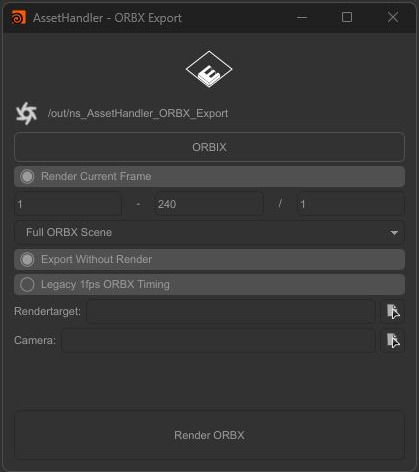
Options of the ORBX Export dialog: mode (Alembic Files or Full ORBX Scene), Render Current Frame or a frame range, Export Without Render, Legacy 1fps ORBX Timing, render target and camera. ORBX archives get a static .bgeo preview geometry.
With Prompt for animation and ROP settings off, every dropped node is exported as a static proxy with the current render settings. Use this to convert many objects in one go.

- Use NetworkImages places the thumbnail next to the proxy node.
- Include all (unused) attributes while export (Redshift) keeps every point, vertex and primitive attribute in the proxy, even the ones the shader does not use. You need this to override attributes later.
Use a proxy
| Option | What it does |
|---|---|
| Add (OBJ Context) | Creates a proxy object (Redshift or Octane) |
| Add (LOP/Stage Context) | Adds the Redshift proxy to the stage |
| Add Wrangle (SOP Context) | Creates a wrangle that sets the proxy as point attribute, for instancing |
| Add (SOP Context) | Loads the .bgeo preview geometry |
| Replace Thumbnail / Viewer | Changes or shows the thumbnail |
| Scatter / Physic Painter | Builds a scatter setup with the proxy |
| Delete Proxy/Archive | Deletes the proxy from the library |